


DBTrader
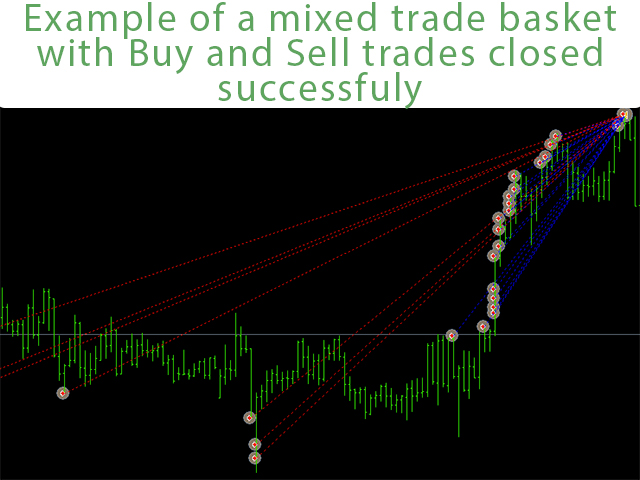
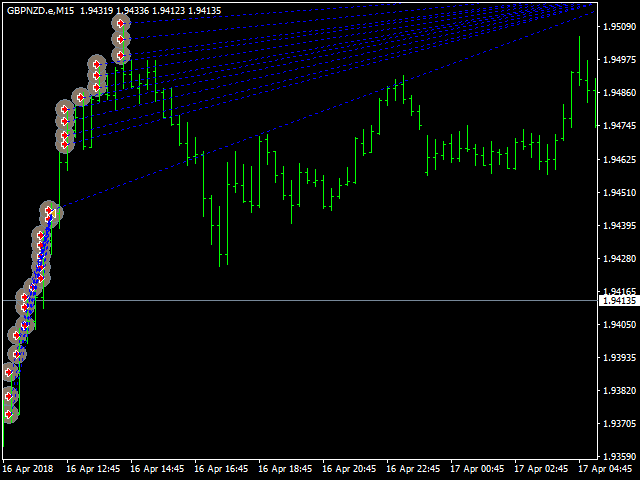
Daily Breakout Basket Trader is an Expert Advisor that is based on trading daily range breakouts using a special basket trading approach using Bi-Directional trading where having both buys and sells as part of your overall trading position.
This EA brings a major enhancement to daily range breakout trading strategy through the use of position entry, money management, filters, and risk control.
Expert Parameters
- CloseImmediately: close all trades on the pair traded.
- CloseBuyTrades: close all buy trades on the pair traded.
- CloseSellTrades: close all sell trades on the pair traded.
- Choose Presets: Here you can choose preloaded conservative settings.
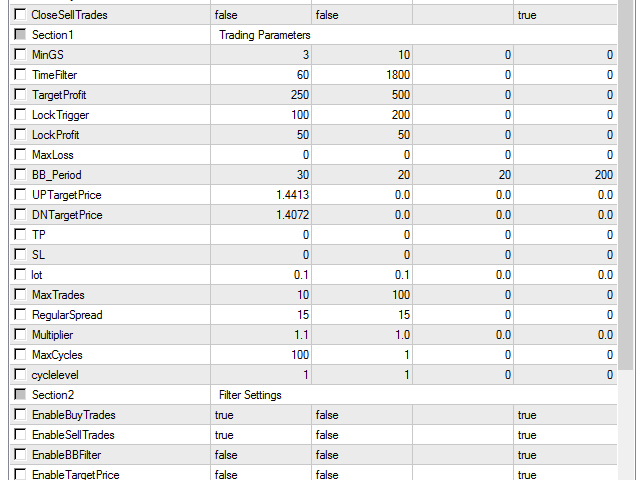
- MinGS: the minimum distance between grid levels in pips.
- TimeFilter: the minimum time between trades in grid in seconds: 1 min = 60, 5 min = 300, 15 min = 900, 30 min = 1800 and so on.
- TargetProfit: the target of profit in USD when grid closes all trades.
- LockTrigger: the minimum profit in USD to activate the locking of profit.
- LockProfit: After the grid has generated a certain amount of profit, all trades on the pair under this level will be closed.
- MaxLoss: the maximum loss allowed where all trades are closed. If you put 0 this function is disabled.
- EmergencyExitProfit: the amount of minimum profit you are ready to get out of in case the market gets locked in a sideways market with several buy and sell trade positions opened.
- BB_Period: the period of the Bollinger Bands used to filter breakout trades.
- UPTargetPrice: upper target above which all trades will be closed if whole grid is in profit and trading stopped until you continue trading.
- DNTargetPrice: lower target below which all trades will be closed if whole grid is in profit and trading stopped until you continue trading.
- TP: If you decide to put a take profit on each trade change it from 0. Zero value means it is deactivated.
- SL: If you decide to put a stop loss on each trade change it from 0. Zero value means it is deactivated.
- lot: the lot size of each trade on the grid.
- MaxTrades: the maximum number of trades that will be opened before the grid is closed. In case you choose multi-cycle trading below than every cycle will have a separate maximum number.
- RegularSpread: The normal spread for taking trades, spread must be below this value.
- Multiplier: You can activate a multiplier to add on new trades in the grid. This can be martingale or more conservative option.
- MaxCycles: maximum number of trading cycles that will be closed in profit before trading will be stopped automatically.
- cyclelevel: Normally the EA will trade 1 grid per day if closed in profit. If you want to manually reactivate another grid on the same pair to trade for the selected day, then you can increase this value. You can also use this to open another grid on a given day.
- EnableBuyTrades: Choose true to enable trading buy trades.
- EnableSellTrades: Choose true to enable trading sell trades.
- HedgingAllowed: Choose false to allow making trades in one direction only.
- EnableBBFilter: Choose true to enable the Bollinger Band filter.
- EnableTargetPrice: Choose true to enable grid to close in profit at target price levels.
- EnableMultiCycles: Choose true to allow EA to open a separate grid on a breakout everyday.
- ProfitLock: Chose true to allow EA to lock profits that have reached the minimum desired profit value.
- EnableContTrade: Choose true to allow continuous trading.
- EmergencyExit: Choose true to enable emergency exit.
- RangeEndingHour: Choose the hour of the daily breakout you wish to trade.
- RangeEndingMinute: Choose the minute of the daily breakout you wish to trade.
- BarsInRange: How many bars back you wish the breakout range to look back. Be careful to choose bars properly on timeframe you will trade.
- HoursValid: How many hours after the range you want to wait for breakout.
- CandleTrigger: You can choose to trade when candle closes above/below the breakout level or just if it touches that level.
- PositionAddingStrategy: You can choose the grid to add positions using averaging up or averaging down. Averaging up means adding while the market is moving in your favor, while averaging down is adding trades while the market is moving against you to average down your cost.
联系方式
公司:顺水的鱼外汇EA
状态:离线 发送信件 在线交谈
姓名:顺水的鱼(先生)
职位:投机客
电话:18391752892
手机:18391752892
地区:默认地区
地址:西安市高新区软件园
邮件:3313198376@qq.com
QQ:3313198376
微信:18391752892
阿里旺旺:顺水的鱼waterfish
Skype:3313198376@qq.com
状态:离线 发送信件 在线交谈
姓名:顺水的鱼(先生)
职位:投机客
电话:18391752892
手机:18391752892
地区:默认地区
地址:西安市高新区软件园
邮件:3313198376@qq.com
QQ:3313198376
微信:18391752892
阿里旺旺:顺水的鱼waterfish
Skype:3313198376@qq.com