

Sequence Project
The Expert Advisor is a very advanced sequential tool that gives each user the possibility to program
the order of tasks according to specific conditions.
Everything can be done in a simple and intuitive way.
The sequencing of the EA's programming ensures that each operation is carried out one after another.
I present the method of operation in the attached movie.
EA global settings
magic – individual EA number. For each EA attached on the same instrument, a different number must be entered to distinguish the transactions concluded by these Eas. You can enter any integer.
pos_X – position of the EA panel in a horizontal position. Value entered in pixels from the left edge of the chart.
Creating sequences
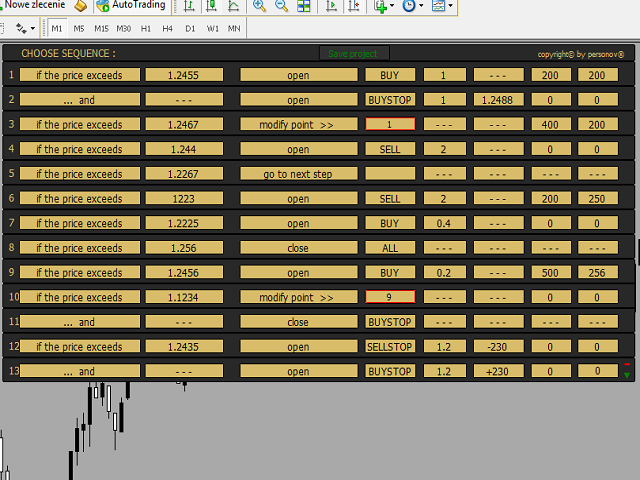
We can create max. 15 segments with the selected sequence.
Each sequence carries out a fixed activity, each of which is carried out in succession.
For example, sequence 9 will be executed after the condition has been met provided that sequence 8 has been previously performed.
The next segments are opened with a green triangle and closed with a red minus.
After programming all sequences, press the "Save project" button on the main panel.
EA will check the correctness of entries in individual segments, and then either a message about entries errors (segment number and field) or a message about the project ready to be launched.
From now on the buttons will appear on the main panel :
- Delete project – deleting the entire project (return to 0)
- Save project – save the project if we make some changes
- Hide project/Show project – hide the project (only displays the main panel, but the project is still active), or show the project again
- Start – start executing the sequence cycle.
After pressing the "Start" button, the execution part begins. EA opens, closes or modifies sequences.
The "Stop project" button appears on the main panel ( stop/delete the execution cycle ).
After executing individual sequences, a given segment is crossed out with a green line as "made".
Notice !
During execution of the sequence (after pressing "Start") you can edit entries in segments that have not yet been made.
However, after each change of the entry, the "Save project" button should be pressed again to check the correctness of the entries.
Description of the sequence segment
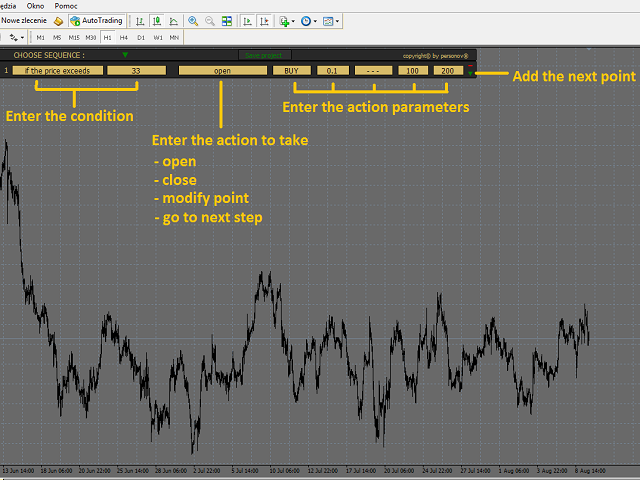
The entire segment consists of eight fields.
The first two are condition fields.
Six more are the fields of action.
There are hints in the fields
Field 1 – drop-down list with a choice :
- „if the price exceeds” – the condition is to exceed the Bid price by the level entered in field 2
- „... and” – the condition for executing this sequence is simply the execution of the previous sequence. This condition is not displayed in the first segment.
- „do it immediately” – this condition is only in the first segment and execution takes place immediately after pressing "Start".
Field 2 – enter the price level if in field 1 the condition is "if the price exceeds"
Field 3 – drop-down list with a selection of to do items :
- open – opening a position with parameters determined in the following fields
- close – closing the position of the type indicated in field 4
- modify point > > - modification of the order from the segment with the number indicated in field 4
- go to next step – go to the next sequence without execution
Field 4 – drop-down list with selection of the type of order. If in field 3 we choose "modify point >>" enter here the number of the order segment to be modified.
Field 5 – size lot of the order being opened.
Field 6 – the opening price of the pending order. You can do it in two ways :
- by entering the opening price
- by entering the opening distance from the current price (in points, value preceded by a + or – sign ) for example +250 or -140.
Notice!!! – when modifying a pending order, only the first method can be used. You can not use the distance method with the + and -.
Field 7 – value Take Profit ( in points ). This value is entered only if in field 3 we choose "open" or "modify point >>".
Field 8 – value Stop Loss ( in points ). This value is entered only if in field 3 we choose "open" or "modify point >>".
状态:离线 发送信件 在线交谈
姓名:顺水的鱼(先生)
职位:投机客
电话:18391752892
手机:18391752892
地区:默认地区
地址:西安市高新区软件园
邮件:3313198376@qq.com
QQ:3313198376
微信:18391752892
阿里旺旺:顺水的鱼waterfish
Skype:3313198376@qq.com