


Trade With Trend Lines
Trend Line Trader
Now, eliminate most of the emotional factors from trading with trend line trader. You can set dynamic sell limits and buy limits with this EA.
Please read the description carefully.
Parameters:
SLMT: SELL LIMIT behavior
BLMT: BUY LIMIT behavior
BSL : STOP LOSS for buy orders
SSL : STOP LOSS for sell orders
BTP : TAKE PROFIT for Buy orders
STP : TAKE PROFIT for sell orders
RC : Risk capital to calculate the lot size
FL : Fixed lots for trading
ID : ID assigned by the EA to the trade to identify the trade. This will help you to close specific trades with Stop orders.
Magic : EA Magic
Max Orders : Max orders that can be opened per side.
Eg: Max Orders = 2
Two sell orders and Two buy orders can be opened.
How to set parameters:
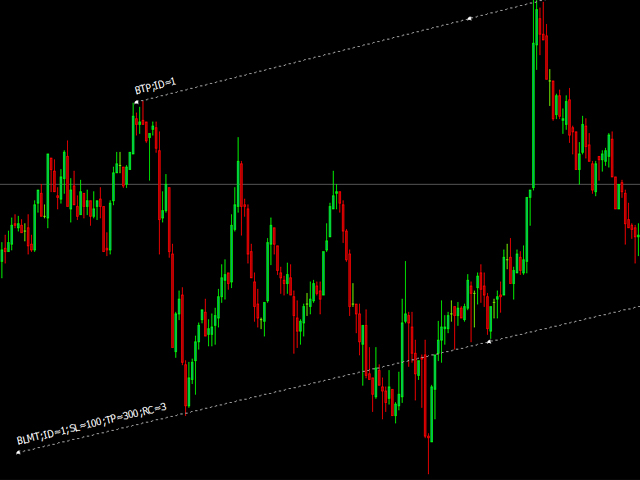
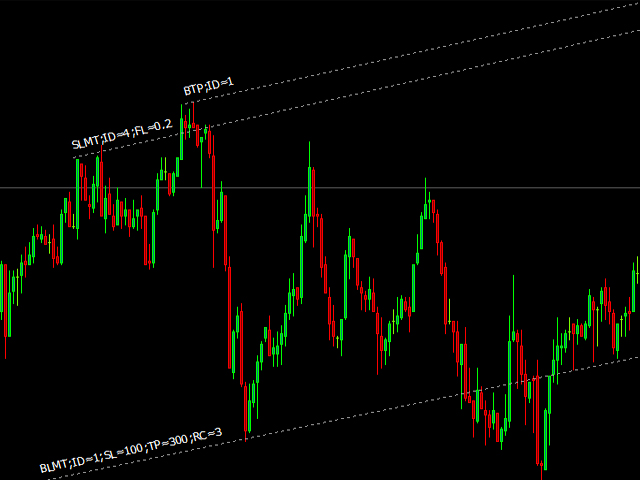
Draw your supports and resistances as usual. Now change the description to match your orders as follows.
Eg: Say you are going to place a;
Sell limit SLMT
Stop loss of 200 points. SL=200
Risk capital of 3% RC=3
Take profit of 300 points TP=300
Placing a dynamic SELL LIMIT
So once you change the description of the trend line that should work as a sell limit will be as SLMT;SL=200;TP=300;RC=3;ID=1
Note that each parameter is separated with a semi colon (;). A semicolon at the end of the parameter list will not be necessary. For this version, Please enter all parameters in capital letters.
ID parameter is assigned to the order as a comment. It will be explained in next section.
You can just omit the rick capital and use fixed lot sizes. Just remove RC=3 and add FL=0.20 or any lot size you require. If you place both RC and FL, RC will be given the priority. However, if you omit SL parameter, then RC parameter will be neglected and fixed lot size will be used to open the trade. If you omit both RC and FL, then the minimum contract size (0.01) will be opened.
Placing a dynamic STOP LOSS
once you have placed a SELL LIMIT, you can set the STOP LOSS within the same line so the trade will be opened with that SL and TP. However, should you require to set a dynamic STOP LOSS, you can just draw the line and just change the description to STP. (Sell Take Profit). once the price drops below that line ALL sell orders opened by that EA will be closed. If you want to close only a specific sell order, just add the ID parameter to the sell limit before placing the trade. Then add the same id parameter to SSL line and it will close only the relevant sell order.
Eg:
Parameter-------- Result
SSL------------------Closes all sell orders placed by this EA
SSL;ID=2------------Closes the sell order with ID 2 opened by this EA
STP------------------Closes all sell orders opened by this EA
STP;ID=8------------Closes the trade with ID 8 opened by this EA
For your knowledge:
1. When you place trend lines in a small time frame and then move to a higher time frame (Eg: from 1Min to D1), then MT4 will not correctly price the coordinates of the line. I have no idea why this happen but I know It is not a fault of EA.
2. When you attach multiple EAs in to multiple currency pairs at the same time, confirm that you change the EA Magic so no copy of EA will have the same Magic number. If two EAs had the same magic number, then one EA will close orders opened by the other EA which is having the same Magic number.
3. If you remove the "Ray" parameter which is the default for MT4 trend line, the line will not run infinitely and will display its end on the chart. once the current time has passed the ending time of the trend line, the line will be invalidated and no trade operations will be carried out by that line.
Please try this EA on a demo account before running on live accounts so you know exactly how the EA is working.

状态:离线 发送信件 在线交谈
姓名:顺水的鱼(先生)
职位:投机客
电话:18391752892
手机:18391752892
地区:默认地区
地址:西安市高新区软件园
邮件:3313198376@qq.com
QQ:3313198376
微信:18391752892
阿里旺旺:顺水的鱼waterfish
Skype:3313198376@qq.com