


Antimartingale
Anti martingale EA
Anti martingale EA is a user friendly and profitable algorithm which uses the MACD, Moving Average, Stochastic and RSI indicators to find good trading opportunities. Using a simple yet effective strategy of selling high and buying low.
User has the option to open trades using a grid strategy when price moves against us. If we do close at a profit we will increase the lot size gradually, that is the concept of the Anti martingale strategy. After closing 5 profitable trades in a row we will return to the predefined initial lot size. The Anti martingale EA also uses Stop Loss to make it safer.
We start with an account of 500$ to trade effectively. Consider using brokers with low spreads such as 3-5 pips max and fast execution. It works on all types of brokers(4 or 5 digit and ECN brokers).
This system is very effective on lower time frames from 5 min to 1 hour charts and in ranging markets.
How to set it
- Take profit (in pips).
- Stop loss (in pips).
- Max. number of open trades. This means the amount of grid trades we have open at one time. If you do not want to use the grid strategy then this value should be set to 1.
- Min. pip distance between two trades. It refers to the distance between two grid trades. It is meant to give price, enough space before opening a new position.
- Lot size. By default set to 0,01. If we have 5 open trades(Max. number of open trades=5) our total lot size of all trades would be 0,05 in this case.
- Show account balance. On the top right corner it will show your current account balance.
- Do you wish to receive emails? By pushing ctrl+O on your MT4 platform the options panel will open. Select the Email tab and fill in the information requested. When the EA opens a trade you will receive an email informing you about the trade.
- Set a unique number for this EA.
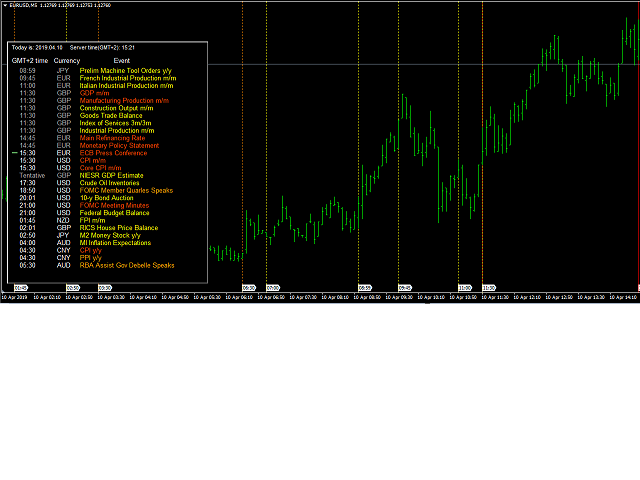
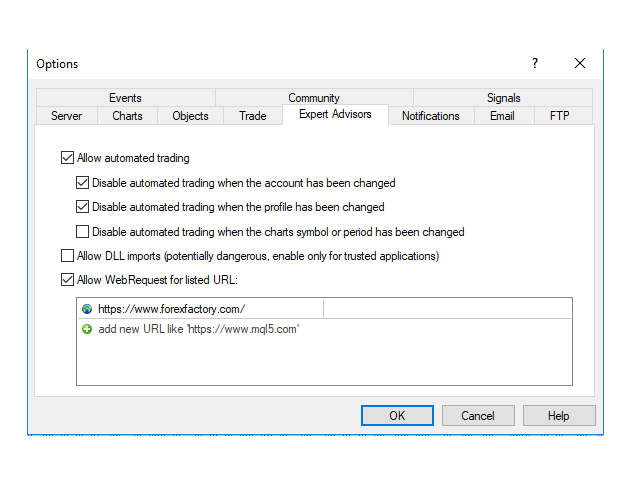
- Enable news data on the chart. To allow the Anti martingale EA to obtain the economic data from the website press ctrl+O and on your "Expert Advisors" tab add the URL https://www.forexfactory.com as shown in the image. The news events on the chart may slow down the EA when running a back test. If you are going to back test the EA set this option to false to make it run faster. If you are trading or forward testing, set it to true. The data is displayed using GMT+2 time zone, that way it matches MT4's time.
- Enable vertical lines on the chart for news events. Set this option to true if you wish to display the lines that correspond to the news event's time.
- Year.
- Month. It refers to the month you wish to examine. It will display all the economic data for that month.
- Disable trades x minutes before a high impact event.
- Disable trades y minutes after a high impact event. If this and the previous parameter are both set to 0, then the EA will open trades as usual even when there is a high impact event.
状态:离线 发送信件 在线交谈
姓名:顺水的鱼(先生)
职位:投机客
电话:18391752892
手机:18391752892
地区:默认地区
地址:西安市高新区软件园
邮件:3313198376@qq.com
QQ:3313198376
微信:18391752892
阿里旺旺:顺水的鱼waterfish
Skype:3313198376@qq.com