


DoubleUp Plus Trade Panel and Symbol Changer
DoubleUp Plus Utility can help you achieve a lot with your trading career.
It will manage your trades starting by plotting both Take-profit and Stop-loss for your trades, then manage it all through by reducing the stop-loss as the price moves deeper into positive for you, it does this in two steps, then move your stop-loss above your entry point to breakeven and make it a RISK-FREE trade, after which it will start trailing the price with your stop-loss as it is moving more into profit in order to protect your already made profits.
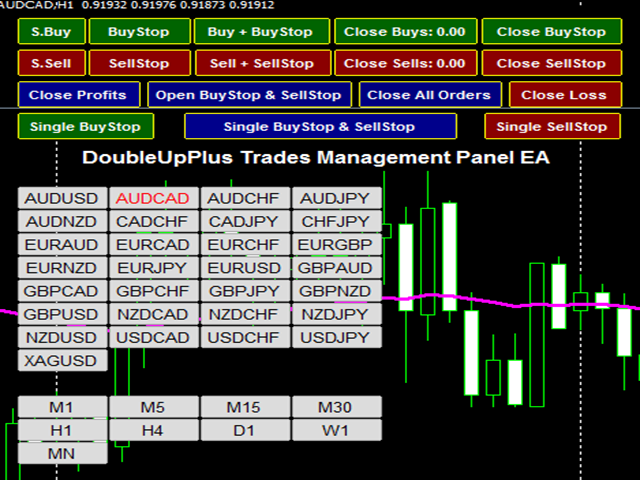
Furthermore, you can carry out all your trading activities right from the chart window without any stress, just click on any button according to your desire.
This one has a lot of features created for both trades’ executions and managements as you can see in the screenshots:
- A total of 17 On-chart Buttons for various trade executions and managements ranges from order opening, closing, deleting etc.
- It will also set your Take-profit and Stop-loss as defined by the trader.
- It can also reduce Stop-loss, set Breakeven and Price Trailing-stop to protect your trades and turn it to a risk-free trade over the time.
- It can be used to close profit or losing trades individually.
- It can also close all manners of open trades etc.
As regards the On-chart buttons, they are very easy to use for their fast response ability. Each of the buttons is labeled according to its function. They are created in a way that you don’t need more than just a click, if you click and it didn’t respond, don’t click it the second time, it has already sent your request to the server. To know the current status of your press-button request, go to “Journal” on the Terminal below, check the message, if it is ‘Requote’, you can click the button again until it responds because it means that the server is having issues due to your poor internet connections and thereby rejecting your request but if there is no message response, then relax, the server is processing your request, don’t click again otherwise you will end up with so many open orders as much as you have clicked! With these buttons, you can open, delete, and close etc.
In the parameter settings, you have the features below:
- Magic No: The default value 1234, you can change it to your own
- Lot size: 0.1 by default
- Trade ID: Use this for order identification
- Distance from the price/candle for pending orders = 20
- Space between the multiple pending orders = 25
- Take-profit-1 = 100
- Take-profit-1 = 75
- Take-profit-1 = 50
- Take-profit-1 = 25
- Common Stop-loss = 25
- Use Individual SL = false (by default)
- IND. Stop-loss = 25
- Plot SL & TP for empty order = true
- Empty TP = 150
- Empty SL = 50
- Use Profit target to close all orders if reached = false (by default)
- Profit target amount = 0.0 (in account currency)
- Use Maximum loss to close all orders if reached = false (by default)
- Maximum allowed loss = 0.0 (In account currency)
- Enable Trades Management Panel = true
- When price moves above Open price 1 = 20
- Reduce stop-loss to = 20
- When price moves above Open price 2 = 30
- Reduce stop-loss behind open price to = 5
- Trail Price above open price = 45
- Breakeven point above open price = 10
- Constant trailing point above open price = 50
- Show Trade Management Panel = true
- Left/right shift on-chart = 10
- Up/down shift on-chart = 10
- Show Symbol chart = true
- Buttons horizontal row = 4
- Left/right shift on-chart = 20
- Up/down shift on-chart = 180
*** On-chart Buttons: These buttons each is named according to its operation, just a click and its done!
Symbol Changer (added)
Symbol and Time frame changer is inbuilt into this utility to make trading easier and enjoyable for the traders using it. It can change one symbol to the other and also one time-frame to the other.
As you use this versatile and multipurpose utility, I wish you the best of trading time.
Cheers.
状态:离线 发送信件 在线交谈
姓名:顺水的鱼(先生)
职位:投机客
电话:18391752892
手机:18391752892
地区:默认地区
地址:西安市高新区软件园
邮件:3313198376@qq.com
QQ:3313198376
微信:18391752892
阿里旺旺:顺水的鱼waterfish
Skype:3313198376@qq.com