

Ichimoku Scanner
This indicator is designed to scan all pairs and symbols, for all selected time frames, to find a Tenkan and Kijun Cross or a breakout of the Ichimoku Cloud.
Features
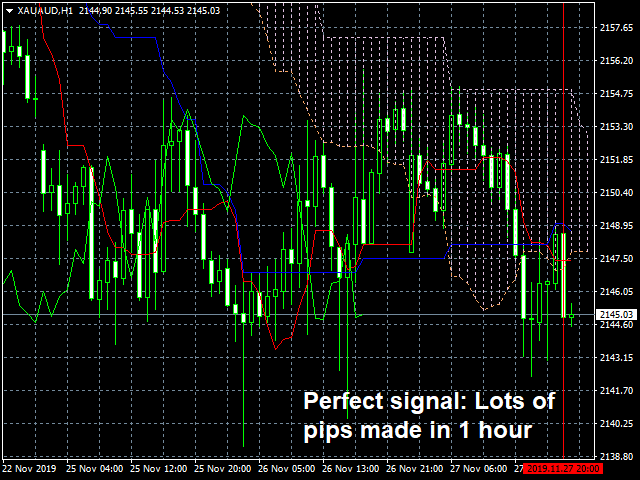
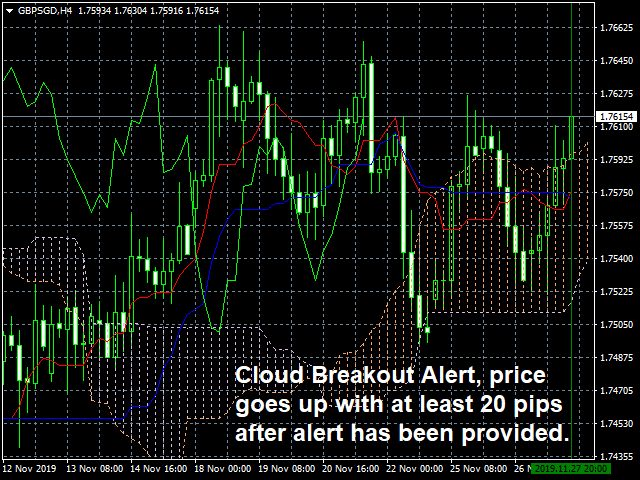
The scanner will send an alert if a breakout is found of the Ichimoku Cloud or if a cross has been found of the Tenkan and the Kijun.
Ichimoku Cloud Breakouts alerts
With Ichimoku Cloud trading strategy, you enter the market when the price breaks out of the Cloud. This scanner will send an alert when the there is a break in of the Cloud, so you can enter the market following this strategy. Enter the market in the direction of the breakout, attempting to catch a trend.
Tenkan and Kijun Cross alerts
The most common usage of the Tenkan and Kijun are the ‘cross’. The Tenkan and Kijun Cross can often indicate when a trend is about to begin by forming a cross (upward cross = possible Bullish trend, downward cross = possible Bearish trend).
If the Bullish cross happens below the Cloud, then it is considered asa ‘weak’ signal. If the same Bullish cross happens withing the Cloud, it is a medium signal. It is considered a strong signal when the bullish cross happened above the Cloud. The opposite is true for bearish signals.
Other features:
- Scans all symbols visible in your Market Watch window, or all symbols available for your broker at the same time.
- Indicator only have to be installed on one chart to scan the entire market.
- Specify which time frame you want to monitor. Each time frame can be selected in the settings.
- Receive alerts in the MT4 terminal for each trade opportunity found.
- The dashboard will show the latest alerts provided by this Scanner. When you click on an alert in the dashboard, a new chart will be opened for the applicable Symbol and time frame. The new chart will highlight the alert with a vertical line.
- Receive alerts on your mobile phone, so you never miss a trade opportunity! (MT4 notifications are use)
- Low CPU usage.
Installation
- Download the Indicator in your MT4 terminal after you have purchased the product.
- Place the indicator on one chart in your MT4 terminal (it does not matter what chart is used, any symbol and time frame can be used), and from that moment the entire market will be scanned for all pairs and symbols, and for all time frames as you have configured.
Parameters
----------- General settings -----------
- Send signals to alert Message Box: If set to true, alerts will be issued to your MT4 terminal
- Send signals to Mobile (Notifications): If set to true, alerts will be issued to your mobile using the MT4 Notifications
- Scan pairs in Market Watch only: If set to true, only pairs and symbols within the MT4 Market Watch will be scanned. If set to false, all pairs and symbols available for your broker will be scanned and monitored
- Symbols To Scan: You can enter symbols you want to scan by this scanner in this field. The symbols needs to be the same as they are shown on your Market Watch window. The field is case sensitive. Each symbol needs to be separated by a comma (,).
- alert and Scan for each Xx bar: If set to true, pairs and symbols are scanned for each new bar of the applicable time frame

状态:离线 发送信件 在线交谈
姓名:顺水的鱼(先生)
职位:投机客
电话:18391752892
手机:18391752892
地区:默认地区
地址:西安市高新区软件园
邮件:3313198376@qq.com
QQ:3313198376
微信:18391752892
阿里旺旺:顺水的鱼waterfish
Skype:3313198376@qq.com