


SD Delete Comment
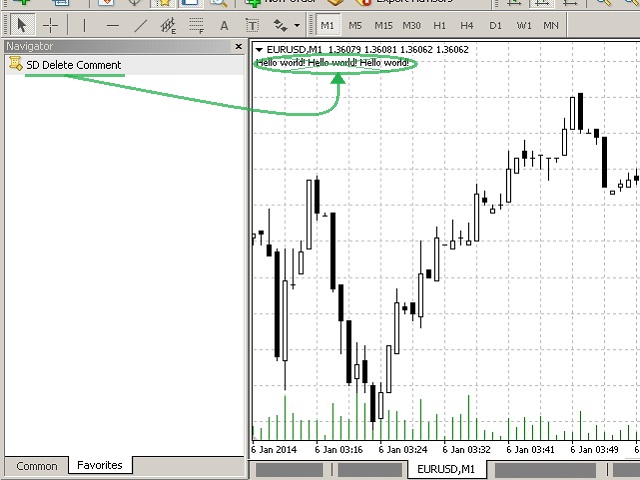
This script is intended for deleting comments left in the upper left corner of the chart.
It will be useful when there is a text in the upper left corner of the chart left by some programs using the function Comment(). For example:
- scripts that inform about their current activity.
- Indicators or Expert Advisor that are being improved or downloaded from the Internet.
The script will quickly delete the comment, report about it using an alert and then stop working. SD Delete Comment does not delete any other objects.
Some script advantages:
When deleting a comment, it automatically saves it to the trading terminal's log file: *MQL4Logs. This may be convenient when deleted data can be then used in comparisons or analyses. After that, you can manually find the text deleted with the script using the Experts folder. The tab contains the filter allowing you to quickly move to the necessary entries in the trading terminal log files. In order to activate the filter:
- move to the "Experts" tab of the trading terminal;
- click the right mouse button to open the menu;
- select "View".
You can assign hotkeys for SD Delete Comment or add the utility to the Favorites tab in the "Navigator" window.
Quick Start Using Keyboard or Favorites in the Navigator:
If the "Navigator" window is not opened in the terminal, then:
- click "View" in the upper menu of МetaTrader 4;
- choose "Navigator" in the list;
- on the "Common" tab navigate to the application (Expert Advisor, indicator, script) that you want to start quickly;
- click on the application name with the right mouse button;
- click "Add to favorites" and/or "Set a hotkey" in the menu.
状态:离线 发送信件 在线交谈
姓名:顺水的鱼(先生)
职位:投机客
电话:18391752892
手机:18391752892
地区:默认地区
地址:西安市高新区软件园
邮件:3313198376@qq.com
QQ:3313198376
微信:18391752892
阿里旺旺:顺水的鱼waterfish
Skype:3313198376@qq.com