


SymbolSynthesizer OrderPanel
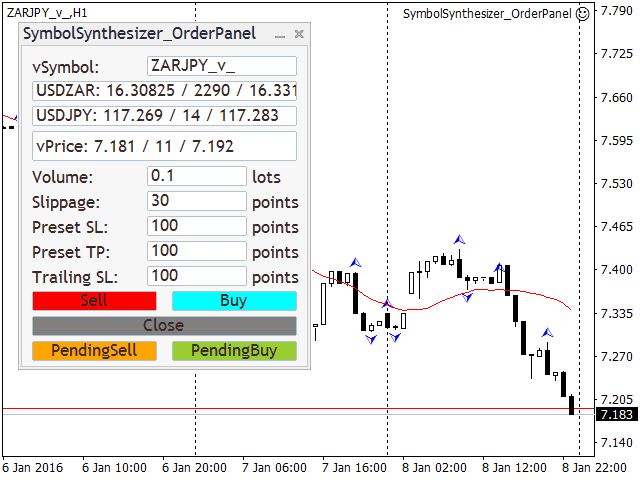
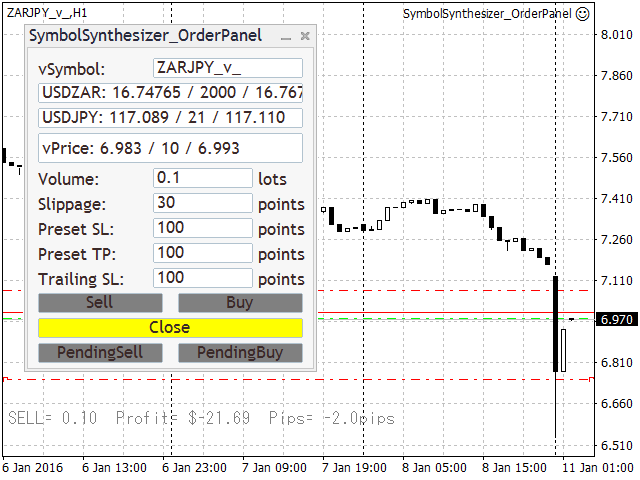
It synthesizes any symbol if you have the source symbols in Market Watch window. This is the Order Panel for that. Same concept with symbolsynthesizer.mq5 (https://www.mql5.com/en/code/909), but a lot more functions. First design was to use with SymbolSynthesizer_Chart.mq4 (https://www.mql5.com/en/code/14596). You can download it free. And then generate a real-time off-line chart for the pair symbol you want to synthesize, please refer to the explanation on the link above. You can attach this EA on the generated chart. If you do so, the synthesized symbol and source symbols will be set automatically by the chart setting. Also show ask line and trade levels. You can use this panel also without virtual chart, but not with drag'n drop controls and pending order function.
When you click "Buy" or "Sell" button, the panel will entry two positions. One is source symbol 1 with preset lots, and also source symbol 2 with the automatically calculated lots. So they make virtual position for the synthesized symbol. If it's on the synthesized chart, SL/TP are modifiable by drag'n drop like any MT4 online charts, but after selected by double click. If you move the Buy entry line to the above, the TP line will be there. Move down makes (if SL does not exist) or moves SL line. Pending Order can be put by 2 steps. First click either "Pending Sell" button or "Pending Buy" button, and then click on the price you want to put the order in the chart. For example, if you click "Pending Buy" and you click above the Ask line, it will be pending Buy-Stop order, but if click below the Ask line, it will be pending Buy-Limt order.
only one order or position for one chart.
So, if you want to open multiple positions for same symbol, you need to synthesize different name symbol with different magic but same source symbols. Or different source symbols for opposite position if your broker doesn't like hedge.
Note: SL/TP are not on the server side, they are on the EA which is attached. Thus if you close your MT4 or the chart, they are not going to work. Same thing for pending order.
Input parameters:
- Magic Number - The magic number
- The digits for synthesized symbol - The digits for synthesized symbol.
- Spread in point. 0 means current. - Since metaTrader 4 history file doesn't have past spread data, we need them to determine Ask price for the case dividing to calculate the virtual prices.
- Virtual symbol - The one you want to generate. Any name is OK but less than 11 characters.
- string sSym01="EURUSD";//Source symbol 1 (This is NOT external variable, automatically set for attached chart symbol)
- Source symbol 2 - Source symbol#2. It must have an exact same name on Market Watch include prefix and/or suffix.
- Calculation method - The calculation to synthesize. "M" means "Multiply", or put "D" means "Divide".
- Show Ask line - True for show Ask line, false for not. Ignored if chart is not the virtual one.
- Show and operate Trade Levels - True for show trade levels, false for not.
- Show Profit and Loss in Text - True for show text about position and profit or loss, false for not.
- Preset Lots for symbol 1 - Default lots for source symbol 1
- Preset Slippage in Points - Default slippage
- Preset Stop Loss in Points - Default preset Stop Loss
- Preset Take Profit in Points - Default preset Take Profit
- Preset Trailing Stop Loss in Points - Default preset Trailing Stop
Examples for source symbols and synthesized symbol
If the virtual price of vSymbol can be calculated by sSym01 multiply sSym02, put "M".
Ex: vSymbol="EURUSD" sSym01="EURGBP" sSym02="GBPUSD"
vSymbol="EURJPY" sSym01="EURGBP" sSym02="GBPJPY"
vSymbol="EURJPY" sSym01="EURUSD" sSym02="USDJPY"
vSymbol="BTCJPY" sSym01="BTCUSD" sSym02="USDJPY"
Note: sSym01 and sSym02 can be switched with each other since we multiply them. Major pair should be sSym01 for more often ticks.
状态:离线 发送信件 在线交谈
姓名:顺水的鱼(先生)
职位:投机客
电话:18391752892
手机:18391752892
地区:默认地区
地址:西安市高新区软件园
邮件:3313198376@qq.com
QQ:3313198376
微信:18391752892
阿里旺旺:顺水的鱼waterfish
Skype:3313198376@qq.com