


TickCollector
metaTrader4 Indicator that collects order data with tick prices, which is then sent to the database at forexpert.co.uk by the utility robot TickTrack.
The data is used to create special charts for you to analyze your trades.
This product is of type 'indicator' so that it may be installed on any chart window and it will co-exist with other indicators and EA-s. It cannot be used on its own, you have to get TickTrack to be able to use the system (TT/TC). You can also get the free version: TickTrack TryOut to see how it all works.
Parameters
- position of the 'Collecting' Indicator - where to place the 'little square' (see in description below)
- Magic Number
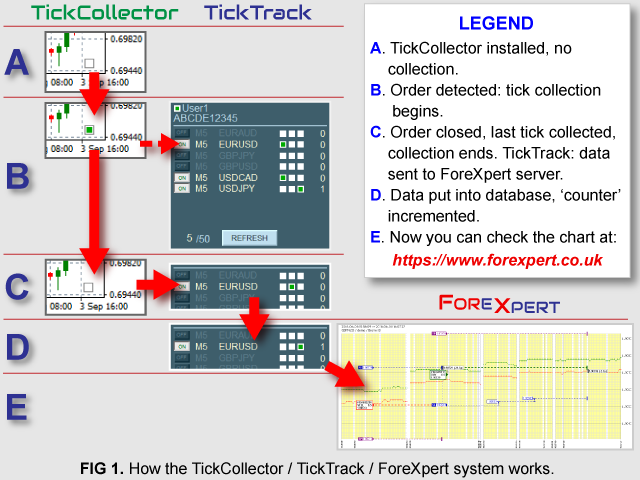
Install it on up to 8 chart windows (but only 4 can be controlled at a time by TickTrack). Every time an order opens, gets modified and closed, the program collects order data with tick prices before and after the event (30 ticks for Open and Close, 20 for Modify). When the order gets closed and all the ticks collected, it creates a temporary file that is sent to the server and put into forexpert's database. In that website you will be able to see all the charts created from your data, any time you need. If, within 30 ticks after order closed, a new is opened, all the data collected until then is sent out and the new collection begins. The ticks are then merged in forexpert site and displayed as a single chart. If there are 2 or more orders at the same time, the collection continues until the last order is closed - it will be displayed as a single chart too. Please see the diagram FIG 1 for the explanation of the TT/TC system.
Before using this system, you have to create a free account at forexpert.co.uk (once there, click LOGIN/REGISTER button at the top of the page and fill the 'Register Form') - you will get a 10-characters User Code which you'll need, along with your chosen User Name, for the TickTrack to connect with the website. Then you can install TickCollector-s on the chart(s). After that, click REFRESH button on the TickTrack panel and it will connect with all the TickCollector-s. Then, use the ON/OFF buttons to switch data collection for the charts you want at the moment.
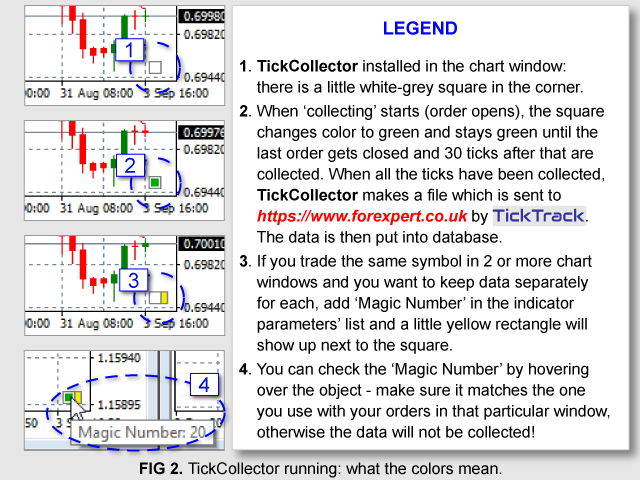
After successful installation, there will be a little square in the corner of the window ('Collecting' Indicator). The square changes color to green every time the 'collection' is pending (order(s) detected) - see FIG 2.
If your trading method requires 2 or more chart windows for the same symbol (e.g. in 'hedging') and you want separate TT/TC charts for each, when loading TickCollector onto a new window you can add Magic Number that matches the one you use in your orders (providing that you are able to set Magic Numbers for your orders). The little yellow rectangle will be added next to the square and if you hover the mouse over it, the number will show up (check out the FIG 2 screenshot). Without Magic Number, the charts will be created for each pair/symbol so for example if you have 2 windows: EURUSD M5 and EURUSD M30, orders from both will be treated as one and put into one set of data.
There is a limit for sets of data that can be created and put into database: 50 per week (5 for TickTrack TryOut). If you reach the limit, you won't be able to collect new data until the next week. If the limit has been reached and there are some orders still open, the data for them is still collected and sent out.
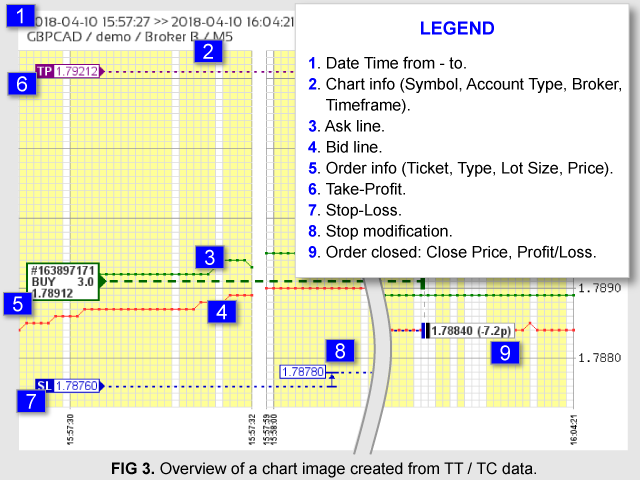
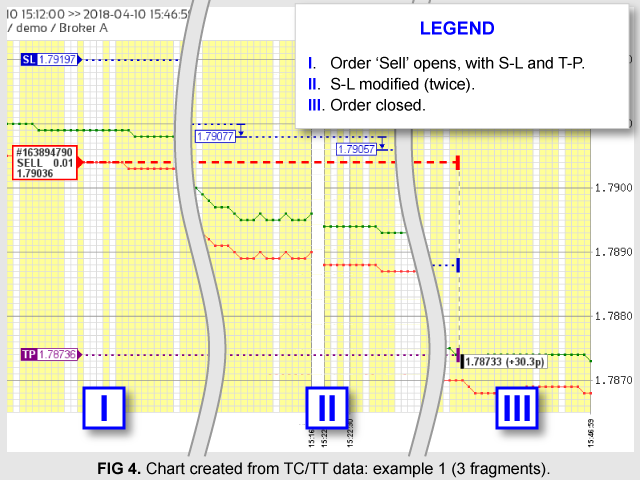
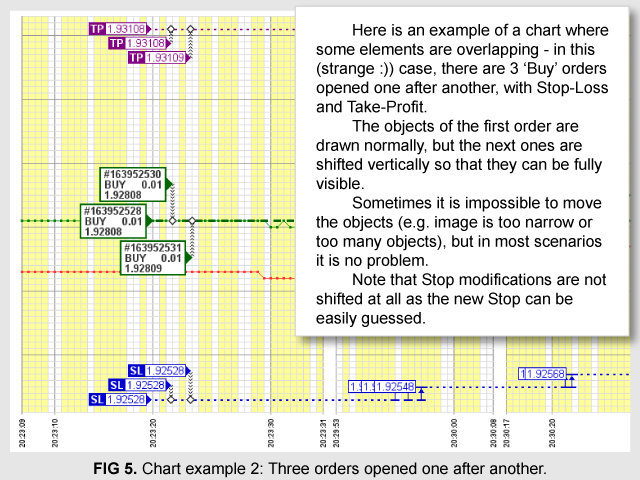
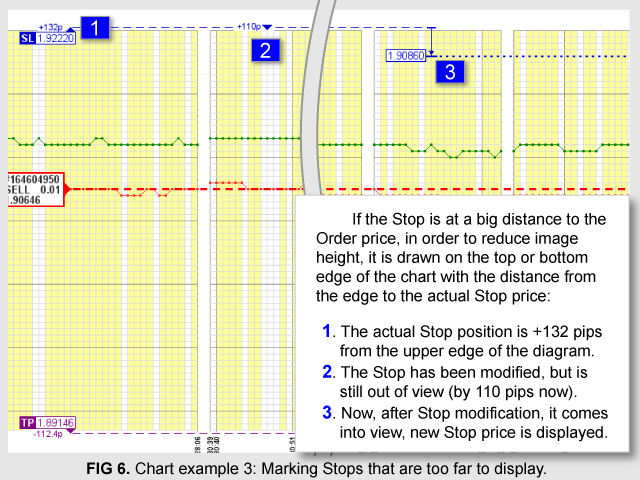
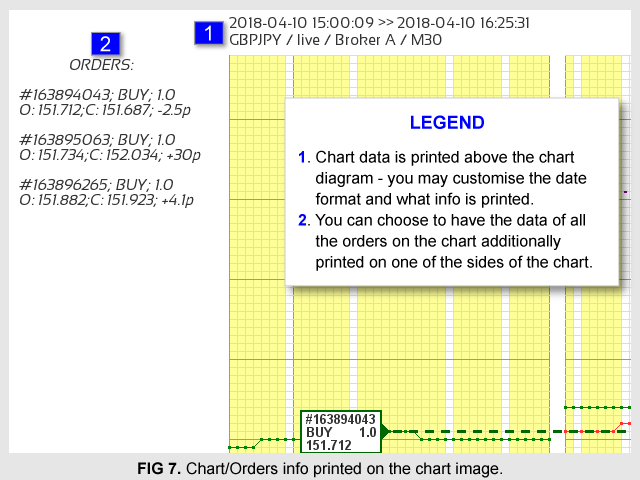
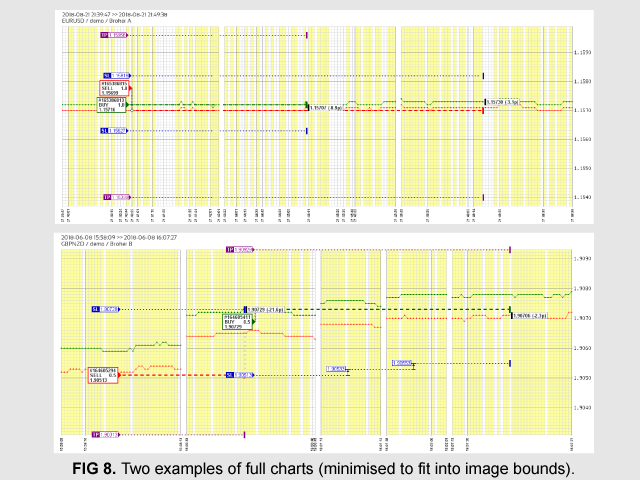
Please check the graphics FIG 3 - FIG 8 to see how the charts created by TT/TC system look like. If you want to check out the whole charts, go to forexpert.co.uk/my-robots/TickTrack/examples - there are some charts I've created when working on the system.
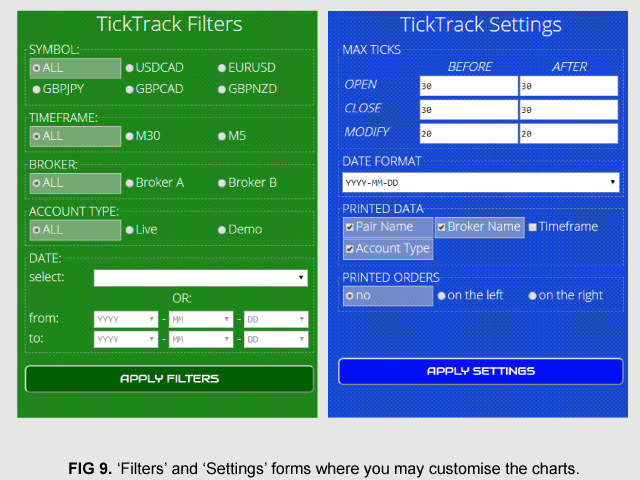
In the website, there are 'Filters' and 'Settings' Forms (FIG 9) which you can use to display charts only for selected Symbol, Broker, Date/Time period etc. and to customize the look of the charts.
This product is a part of a (TT/TC) system. You have to get TickTrack or TickTrack TryOut utility Expert Advisor to be able to use the system.
You cannot install more than 1 TickCollector indicator in the same chart window: that would lead to duplicate data sets and charts!
The TT/TC system creates folders in metaTrader file system: 'TicksData' (for temporary TC data files) and 'Errors' (for temporary data log). All files from these folders are sent to the server and deleted afterwards.
 nload="if(window.viewGallery_GalleryManager) viewGallery_GalleryManager.ImageonLoad(this,7);" />
 nload="if(window.viewGallery_GalleryManager) viewGallery_GalleryManager.ImageonLoad(this,8);" />
状态:离线 发送信件 在线交谈
姓名:顺水的鱼(先生)
职位:投机客
电话:18391752892
手机:18391752892
地区:默认地区
地址:西安市高新区软件园
邮件:3313198376@qq.com
QQ:3313198376
微信:18391752892
阿里旺旺:顺水的鱼waterfish
Skype:3313198376@qq.com