


LotCalculator
This is an indicator for fast and continuous calculation of a trading lot size.
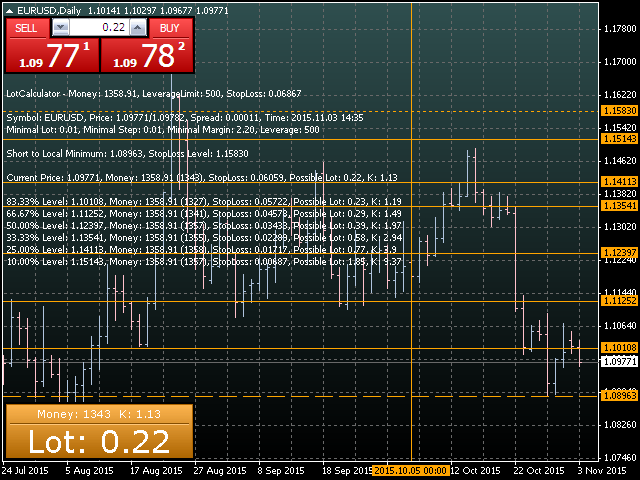
The indicator works in two main modes: Standard mode (Long or Short) and the mode for lot calculation within a price channel (Long or Short to Level) allowing you to perform an efficient speculative trend-following trading on price roll-backs.
To calculate a lot size in the standard mode, specify StopLoss in the calculator parameters. To calculate a lot size inside a price channel, set a vertical line on a chart by means of the trading terminal. To accurately define the price channel borders, local minimums and maximums, the calculator uses the prices from the part of a chart located after the custom vertical line.
Parameters
- Calculator - calculator mode.
- Money - deposit for trading equal to maximum possible loss of a position being opened.
- LeverageLimit - actual leverage size for the selected symbol.
- StopLoss - maximum price change acceptable for your open position.
- CustomLevel - local level to calculate StopLoss from (for special modes only).
- Panel - enable/disable the graphical information panel.
- Text - enable/disable the output of the text information.
Features
- Calculates trading lot with StopLoss from the current price.
- Calculates trading lot with StopLoss from the preset local level.
- Calculates trading lot for several prices inside the preset price channel for rollback trading.
- Manual and automated input of local level data.
- Built-in function for determining local levels.
- The indicator allows you to determine the lot size for reinvestment of the profit from already opened position in compliance with preset StopLoss.
- The StopLoss value can be specified explicitly or as StopLoss Level price value with a negative sign.
- The Money value can be specified explicitly or as percentage of the trading account deposit, or as a value of unused capital reserve with a negative sign.
The LotCalculator indicator calculates possible size of the trading lot for the deposit specified in the Money parameter.
If the Money parameter is set to zero, the indicator uses the current value of the account deposit to perform calculations.
If the StopLoss parameter is set to zero, the indicator offers a system value of this parameter for each symbol.
In the indicator's results K means the speculative level which shows increase in the deposit if the symbol price comes back to the local level.
In the indicator's results the Money value specified within brackets means the sum sufficient for opening a position with specified parameters. Sufficiency of the sum means that the rest of the deposit designated for trading cannot be used as it is not sufficient for opening even a minimum lot for the selected symbol.
The calculator can be used in any EAs and scripts via the iCustom() function.
- The current calculated trading lot value is stored in a zero bar of the indicator buffer at number 1.
- The current calculated speculative level is stored in a zero bar of the indicator buffer at number 2.
The calculator data can be received only via the global variables of the client terminal.
The current calculated trading lot value is stored in the global variables with the names like LotCalculatorName and LotCalculatorId, while the current calculated speculative level is stored in the global variables with the names like: LotCalculatorNameK and LotCalculatorIdK, where Name is a Symbol() name, while Id is a ChartID().

状态:离线 发送信件 在线交谈
姓名:顺水的鱼(先生)
职位:投机客
电话:18391752892
手机:18391752892
地区:默认地区
地址:西安市高新区软件园
邮件:3313198376@qq.com
QQ:3313198376
微信:18391752892
阿里旺旺:顺水的鱼waterfish
Skype:3313198376@qq.com