

CSI
The CSI shows the Currency Strength Index indicator in separate window. This indicator's comparison is calculated by the same algorithm as the CurrencyStrength.
Usage
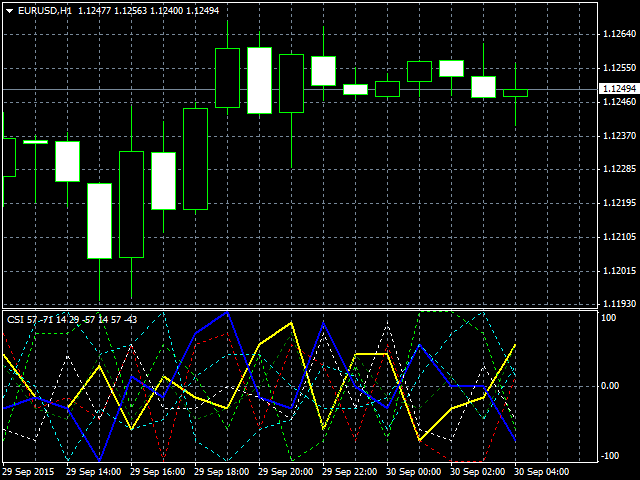
The CSI shows the Currency Strength Index indicator in separate window. At most 8 lines are drawn in the chart. In default setting, USD is yellow, EUR is blue, JPY is red, GBP is cyan, AUD is lime, NZD is green, CAD is goldenrod, CHF is white respectively. If the currency is included in the currency pair of chart, the line is the solid and the dot otherwise. If the currency is ''strong'', the indicator value increases (maximum : 100), Conversely ''weak'', it decreases (minimum : -100).
Input Parameters
- Comparator — The algorithm using the comparison. HIGHLOW, SMA, and EMA is available. (Default: HIGHLOW)
- ComparatorParameter — The parameter of Comparator used in SMA and EMA.
- UseUSD — Use USD or not. (Default: true)
- UseEUR — Use EUR or not. (Default: true)
- UseJPY — Use JPY or not. (Default: true)
- UseGBP — Use GBP or not. (Default: true)
- UseAUD — Use AUD or not. (Default: true)
- UseNZD — Use NZD or not. (Default: true)
- UseCAD — Use CAD or not. (Default: true)
- UseCHF — Use CHF or not. (Default: true)
How to calculate the currency strength index
Table 1: Currency pairs
| USD |
EUR |
JPY | GBP | AUD | NZD |
CAD |
CHF | |
|---|---|---|---|---|---|---|---|---|
| USD | - | EUR/USD | USD/JPY | GBP/USD |
AUD/USD | NZD/USD |
CAD/USD | USD/CHF |
| EUR | EUR/USD |
- |
EUR/JPY |
EUR/GBP |
EUR/AUD |
EUR/NZD |
EUR/CAD |
EUR/CHF |
| JPY | USD/JPY |
EUR/JPY |
- |
GBP/JPY |
AUD/JPY |
NZD/JPY |
CAD/JPY |
CHF/JPY |
| GBP | GBP/USD |
EUR/GBP |
GBP/JPY |
- |
GBP/AUD |
GBP/NZD |
GBP/CAD |
GBP/CHF |
| AUD | AUD/USD |
EUR/AUD |
AUD/JPY |
GBP/AUD |
- |
AUD/NZD |
AUD/CAD |
AUD/CHF |
| NZD | NZD/USD |
EUR/NZD |
NZD/JPY |
GBP/NZD |
AUD/NZD |
- |
NZD/CAD |
NZD/CHF |
| CAD | USD/CAD |
EUR/CAD |
CAD/JPY |
GBP/CAD |
AUD/CAD |
NZD/CAD |
- |
CAD/CHF |
| CHF | USD/CHF |
EUR/CHF |
CHF/JPY |
GBP/CHF |
AUD/CHF |
NZD/CHF |
CAD/CHF |
- |
The CurrencyStrength uses 8 currencies and 28 currency pairs at most. Used currency pairs are shown in Table 1. Note that available currency pairs depend on the broker.
Table 2: Comparator sign
| USD | EUR |
JPY |
GBP | AUD |
NZD |
CAD |
CHF | |
|---|---|---|---|---|---|---|---|---|
| USD |
- |
+ |
- |
- |
- |
- |
+ |
|
| EUR |
+ |
+ |
+ |
+ |
+ |
+ |
+ |
|
| JPY |
- |
- |
- |
- |
- |
- |
- |
|
| GBP |
+ |
- |
+ |
+ |
+ |
+ |
+ |
|
| AUD |
+ |
- |
+ |
- |
+ |
+ |
+ |
|
| NZD |
+ |
- |
+ |
- |
- |
+ |
+ |
|
| CAD |
+ |
- |
+ |
- |
- |
- |
+ |
|
| CHF |
- |
- |
+ |
- |
- |
- |
- |
The comparator sign is shown in Table 2. Each sign corresponds to the currency pair of same position in Table 1. The comparator compares the latest value with one before. Signs that equal the table 2 are counted. ''Weak'' is computed with the negated table 2 and sum to ''strong'' count. The total count is divided by the number of available currency decided by input parameters. Finally, the value multiply 100 to scaling.
ex. Target currency is USD.
Comparator results are ...
EUR/USD: -
USD/JPY: +
GBP/USD: -
AUD/USD: -
NZD/USD: -
CAD/USD: -
USD/CHF: +
Signs that equal the table 2 are counted. In this case, the count is 8. The result ''8'' is divided by 8. As a result, USD's CSI is 100.
状态:离线 发送信件 在线交谈
姓名:顺水的鱼(先生)
职位:投机客
电话:18391752892
手机:18391752892
地区:默认地区
地址:西安市高新区软件园
邮件:3313198376@qq.com
QQ:3313198376
微信:18391752892
阿里旺旺:顺水的鱼waterfish
Skype:3313198376@qq.com