


Investment GBPCAD
The Expert Advisor operates based on 4 trading methods, using various built-in MT4 indicators. The EA can be attached to 4 charts with different methods and the same magic number. In this case the EA will operate as one unit, taking into account open orders. If you set different magic numbers, the EA will operate as four different trading methods. If you set different magic numbers, use them like this: on chart 1 magic=1, on chart 2 magic=50, on chart 3 magic=100, on chart 4 magic=150. During backtesting the EA passed through all market conditions over the past 10 years showing good performance. It works on one currency pair - GBPCAD.
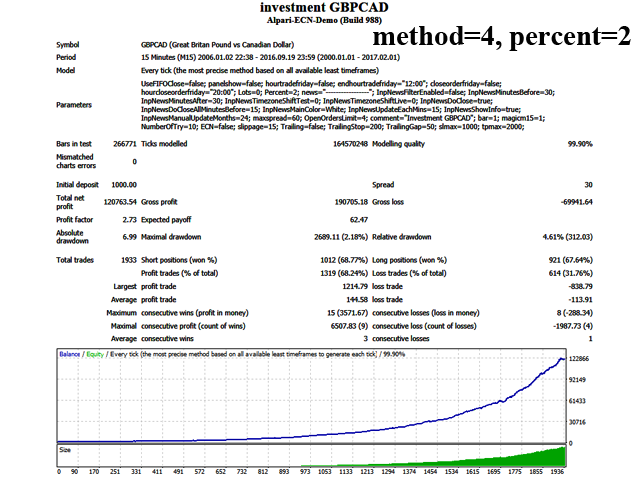
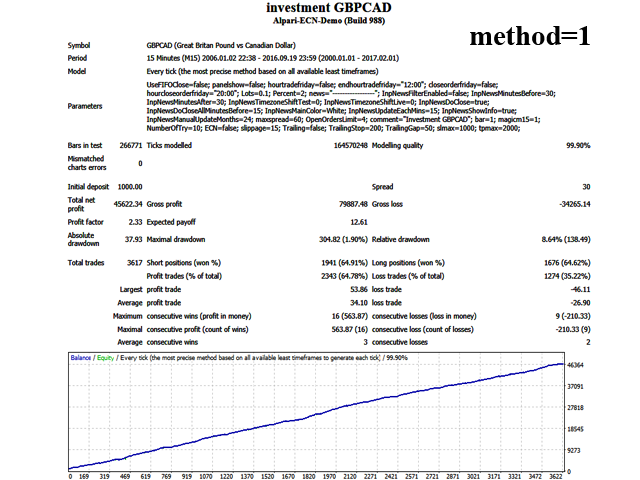
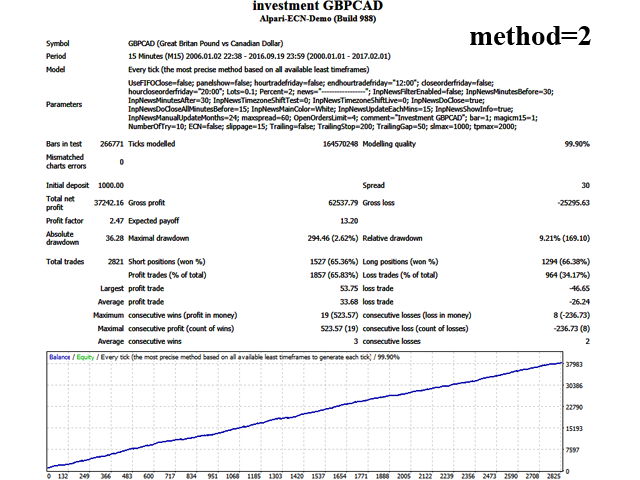
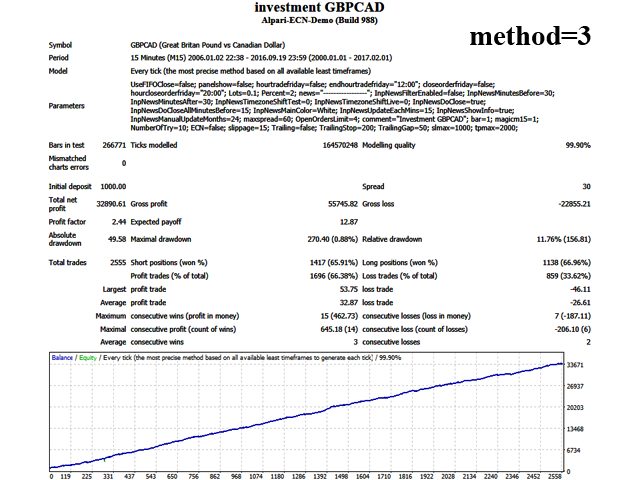
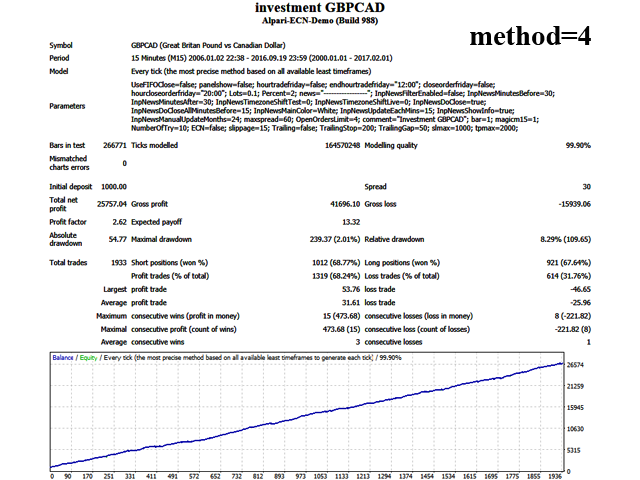
Orders are opened when a new bar appears. The EA checks the values of the previous bars, and if the parameters match, it opens an order. The EA does not use complex strategies. Orders are closed either by stop loss or take profit. The EA can be tested by Open prices. It was backtested and optimized using real ticks with 99,9% quality.
The EA contains the News Stop Trading system, which suspends trading during the news releases.
Real operation monitoring as well as my other products can be found here: https://www.mql5.com/en/users/keasotik/seller
To enable News Stop Trading, tick “Allow WebRequest” option and add "http://www.dailyfx.com" to the list of URLs for WebRequest. To do this, open Tools > Options > Expert Advisors. Check the option "Allow WebRequests for listed URL:", add "http://www.dailyfx.com" and click OK.
Features
- Visible Stop Loss;
- No Martingale;
- No grid;
- No Arbitrage;
- You can start trading 0.01 lot with the initial deposit of $200.
Custom Settings
- Recommended pair: GBPCAD;
- Run it on the M15 timeframe.
Description
- UseFIFOClose - close orders in compliance with FIFO;
- panelshow - display the panel of total balance for today, yesterday, the day before yesterday;
- hourtradefriday - disable trading on Friday at the specified time;
- endhourtradefriday - time to stop opening orders on Friday;
- closeorderfriday - close open orders on Friday after the specified time;
- hourcloseorderfriday - time to close open orders on Friday;
- Lots - fixed lot; if 0, activates Percent;
- Percent - percentage of free margin;
- InpNewsFilterEnabled - enable the News Stop Trading system;
- InpNewsLevel - importance of the news to stop trading;
- InpNewsMinutesBefore - the number of minutes before the news release to stop trading;
- InpNewsMinutesAfter - the number of minutes after the news release to resume trading;
- InpNewsTimezoneShiftTest - time zone offset for the testing mode;
- InpNewsTimezoneShiftLive - time zone offset for the live trading mode;
- InpNewsDoClose - close orders before the news release;
- InpNewsDoCloseAllMinutesBefore - the number of minutes before the news release to close orders;
- InpNewsMainColor - color of the chart messages;
- InpNewsUpdateEachMins - news update time in minutes;
- InpNewsShowInfo - display messages on the chart;
- InpNewsManualUpdateMonths - the number of months to perform a manual news update (chart button);
- OpenOrdersLimit - choose the number of opened orders at the same time;
- maxspread - maximum spread;
- magicm15 - number to identify the EA orders (for example, if magic = 1, orders will be opened from 1 to 41);
- comment - comment to open orders;
- NumberOfTry - the number of attempts to close, open and modify orders;
- ECN - set SL and TP together with the order, or after it had been opened (for ECN accounts);
- slippage - slippage;
- method trade - select trading mode from 1 to 4;
- Trailing - enable the trailing stop mode;
- TrailingStop - profit in points to activate the trailing stop;
- TrailingGap - step for moving the trailing stop;
- breakeven - enable/disable breakeven;
- breakeven distance - the number of points to activate the breakeven;
- breakeven pips - the number of points to place the breakeven;
- maxsl - maximum allowed SL;
- maxtp - maximum allowed TP.
Backtest and Analysis:
- Backtest with 99% quality over 10 years;
- Reliable trading on GBPCAD.
状态:离线 发送信件 在线交谈
姓名:顺水的鱼(先生)
职位:投机客
电话:18391752892
手机:18391752892
地区:默认地区
地址:西安市高新区软件园
邮件:3313198376@qq.com
QQ:3313198376
微信:18391752892
阿里旺旺:顺水的鱼waterfish
Skype:3313198376@qq.com