

Drawdown Control
The Drawdown Control is a useful utility (use it like an EA) to limit the drawdown of any MT4 account.
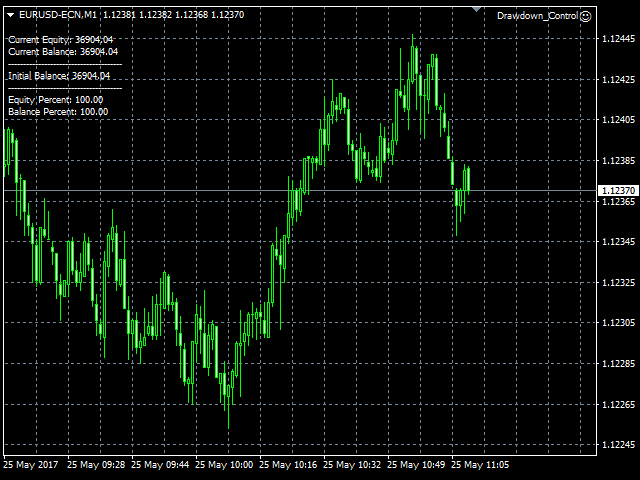
You can choose between different options how DC should react if the drawdown reaches critical levels that are fully customizable. To utilize the symbol with the most ticks per minute it is highly recommended to put the product on an EURUSD-M1 chart.
Live account utilizing Drawdown Control: https://www.mql5.com/en/signals/296875 [The system runs as investment product @ Darwinex now and can't be followed anymore.]
Input Parameters
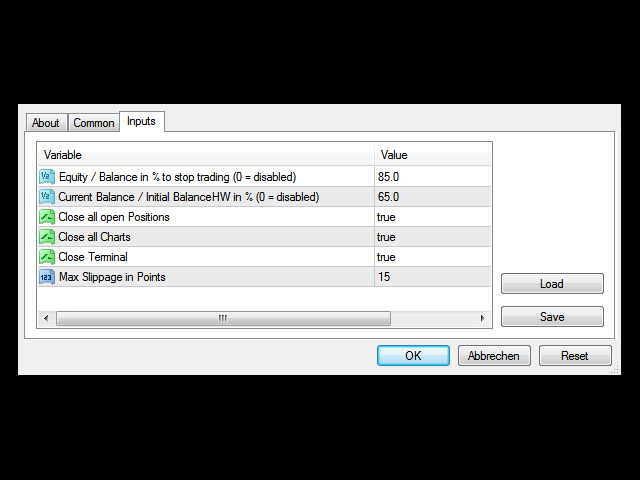
- Equity / Balance in % to stop trading (0 = disabled): 85.0 [etc.]
- Current Balance / Initial BalanceHW in % (0 = disabled): 65.0 [etc.]
- Close all open Positions: true [true/false]
- Close all Charts: true [true/false]
- Close Terminal: true [true/false]
- Max Slippage in Points: 15 [etc.]
Features Description
- “Equity / Balance in % to stop trading (0 = disabled)”
This feature defines a value that must be undercut to trigger the DC's intervention. The limit you set here represents the current ratio between your account's equity and balance. For example if you want to accept maximum 15 % of floating drawdown you must input “85.0”. In other words: If your current account’s equity will be reduced to 85 % the EA will become active.
If you don’t want to use this feature please set it to “0”.
- “Current Balance / Initial BalanceHW in % (0 = disabled)”
This feature also defines a value that must be undercut to trigger the product's intervention. The limit you set here represents the ratio between your account's current balance and its initial balance (when starting DC the first time). For example if you want to accept a drawdown of your account's balance “overall” maximum 35 % you must input “65.0”. In other words: If your current account's balance will be reduced to 65 %, DC will become active.
The product also intelligently considers the growth of your account's fund. For an example let's say that you're starting with 1000 USD and want to accept maximum 50 % “drawdown of balance”. So you input “50.0” to enable the DC's reacting when balance reaches 500 USD. But you're making some good trades and balance grows to 1500 USD. From now on you want the product to become active when balance falls below 750 USD. That's exactly the logic this utility uses and it doesn't matter if your balance increases because of a win / deposit / rebate / interest etc. Therefore “BalanceHW” stands for “Balance High Watermark”.
- “Close all open Positions” / “Close all Charts” / “Close Terminal”
These features – if set to “true” – will become active as soon as the drawdown reaches any critical level (see above).
- “Max Slippage in Points”
This feature can only be utilized @ brokers that support/offer the MT4's “Maximum deviation” function to limit the accepted slippage when opening or closing positions. The input parameter's value refers to the last decimal digit of a currency pair's price. For example when trading on a 5-digit FX broker “one point” is 0.00001. If you're also trading on other instruments like indices and stocks etc. you should leave the default value “999” unchanged.
important notes
As soon as you make any significant withdrawal don't forget to remove Drawdown Control from your chart and reload it! Please also consider that the maximum accepted total drawdown of your account is “value for feature 1” + “value for feature 2” whereby “value for feature 1” must always be less than “value for feature 2”.
状态:离线 发送信件 在线交谈
姓名:顺水的鱼(先生)
职位:投机客
电话:18391752892
手机:18391752892
地区:默认地区
地址:西安市高新区软件园
邮件:3313198376@qq.com
QQ:3313198376
微信:18391752892
阿里旺旺:顺水的鱼waterfish
Skype:3313198376@qq.com