

FFx ADX
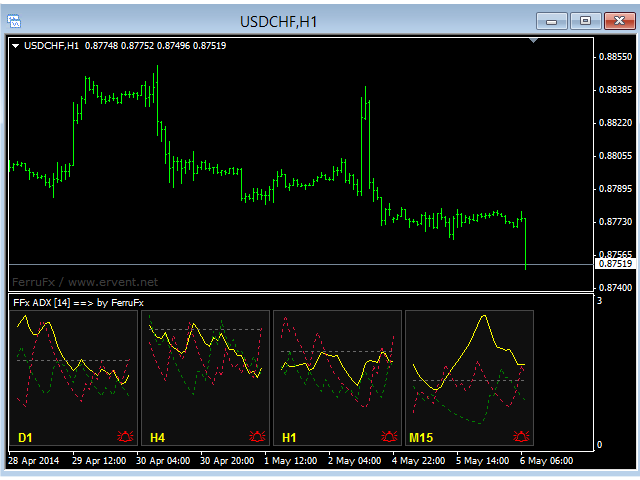
The purpose of this new version of the MT4 standard indicator provided in your platform is to display in a sub-window multiple timeframes of the same indicator. See the example shown in the picture below.
But the display isn’t like a simple MTF indicator. This is the real display of the indicator on its timeframe.
Here's the options available in the FFx indicator:
-
Select the timeframes to be displayed (M1 to Monthly)
-
Define the width (number of bars) for each timeframe box
-
alert pop up/sound/email/push (ADX, +DI/-DI crosses defined level and/or +DI crosses –DI)
-
Activate/deactivate the alert directly on the chart
-
Modify all the colors
-
... and of course all usual settings of the standard indicator
How to set alert:
In the parameters pop up: select the alert you want and the alert mode (pop up and/or sound and/or email and/or push notification)
Then On chart: select the bell icon (double click) then drag and drop it anywhere. At the very next incoming tick, it will retrieve its original position but with a different color signaling that it changed its status. Red to Green means it is now activated … Green to Red means that it is now deactivated.
状态:离线 发送信件 在线交谈
姓名:顺水的鱼(先生)
职位:投机客
电话:18391752892
手机:18391752892
地区:默认地区
地址:西安市高新区软件园
邮件:3313198376@qq.com
QQ:3313198376
微信:18391752892
阿里旺旺:顺水的鱼waterfish
Skype:3313198376@qq.com