

SRB Grid
SRB Grid is a grid trading Expert Advisor, which uses standard indicators Stochastic, Rsi, BBands for entries.
- Set_Name - the name of the set file
- TypeTrades - Expert Advisor operation mode
- MaxSpread - maximum allowable spread value
- MinLeverage - minimum leverage filter
- MagicNumber - unique ID for the EA's orders
- Slippage - slippage in points
- AutoMMBalance - automated money management. Example: baseLotSize = 0.01, and AutoMMBalance = 1000, with a deposit of 5000$ the lot of the first order will be 0.05
- ExecutionPoint - minimum distance in points between orders
- BasketTakeProfit - take profit in points
- TypeTakeProfit - take profit calculation method
- AutoBE_Level - the order starting with which take profit will be set to the breakeven level
- BasketStopLoss - stop loss for a series of orders in points from the last open order
- MaximumBuyLevels, MaximumSellLevels - maximum number of Buy and Sell orders
- StopDrawDownMoney,StopDrawDownMarginPercent- drawdown, reaching which opening new orders is prohibited
- TypeMultiplier - type of order multiplier
- Working_NewBar - the option of opening new orders at the close of a bar of a selected period
- Multiplier_base - basic multiplier for orders
- Multiplier_2,Multiplier_16 - multiplier for orders 2-16, if = 0 the multiplier will be equal to 1
- Multiplier_N - multiplier for orders 17... 100
- TP_1 - TP_16 - take profit for a series of orders, in which there are 1 to 16 orders, if = 0 then BasketTakeProfit
- TP_N - take profit for a series of orders, in which there are 17 to 100 orders
- ADD_ExecutionPoint - points to add to LevelExecution
- ADD_LevelExecution - the order starting with which ADD_ExecutionPoint will be added
- ADD_TP - points to add to BasketTakeProfit
- ADD_TPLevel - the order starting with which ADD_TP will be added
- SRB indicator settings - settings of indicators Stochastic, Rsi, BBands
- Scheduler - time manager to open first orders in the grid
- EAComment - a comment to the EA's orders
- InfoPanel - show info panel on the chart
- ActivityInfoPanelMin - the period of panel activity
- iPrint - add logs
- TypeWork - EA operation mode: by ticks or by timer. Multi-currency settings are effective if TypeTrades = CurrencyControl - EA copies with the same MagicNumber. The EA in the CurrencyControl mode does not trade, it only manages other instances in the strategy tester.
- MaxSymbols - maximum amount of traded instruments
- CurrencyBlocking - block trading for a selected currency in multiple pairs at a time
- DD_Money - drawdown in the deposit currency, after which opening new grids will be disabled
- DD_Percent - drawdown percentage, after which opening new grids will be disabled
- DD_Blocking - the option of blocking opening of new orders if DD_Money DD_Percent triggers
- DD_Email - send email messages if DD_Money DD_Percent triggers
Do not use the Expert Advisor on real accounts without setting the parameters and testing it on a demo account.
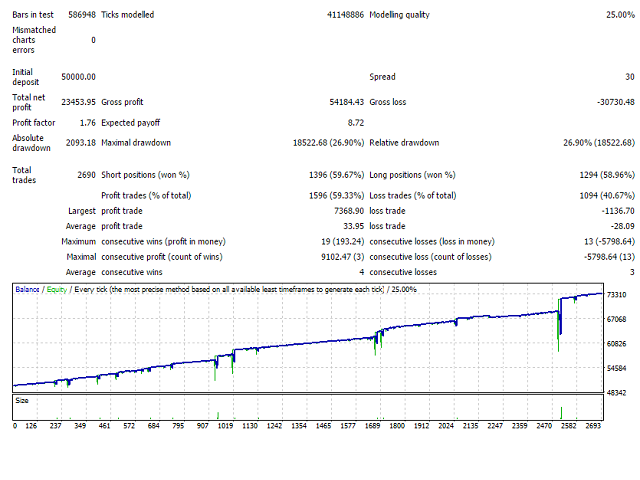
ta itemprop="image" content="https://c.mql5.com/31/138/srb-grid-screen-5345.png" />
联系方式
公司:顺水的鱼外汇EA
状态:离线 发送信件 在线交谈
姓名:顺水的鱼(先生)
职位:投机客
电话:18391752892
手机:18391752892
地区:默认地区
地址:西安市高新区软件园
邮件:3313198376@qq.com
QQ:3313198376
微信:18391752892
阿里旺旺:顺水的鱼waterfish
Skype:3313198376@qq.com
状态:离线 发送信件 在线交谈
姓名:顺水的鱼(先生)
职位:投机客
电话:18391752892
手机:18391752892
地区:默认地区
地址:西安市高新区软件园
邮件:3313198376@qq.com
QQ:3313198376
微信:18391752892
阿里旺旺:顺水的鱼waterfish
Skype:3313198376@qq.com