

BBMA Dashboard
This is a Multi pair and Multi time frame dashboard. it is looking for 9 Essential Types of "BBMA System" Setups and Signals (founder of the system is Mr. Oma ally):
*Reentry Dashboard (touching WMA5)
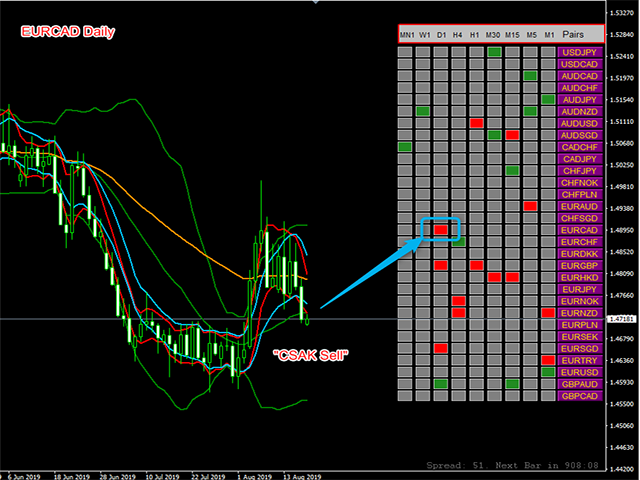
*CSM Dashboard (closing candle out of Bollinger
Band)
*CSAK Dashboard (closing candle beyond Middle Bollinger Band)
*Extreme Dashboard (WMA5 out side the
Bollinger Band)
*RE Dashboard (Reentry > Extreme) - it check 2 consecutive timeframe higher timeframe must be on Reentry, lower timeframe must be
Extreme
*REE Dashboard (Reentry > Extreme > Extreme) - it check 3 consecutive timeframe higher timeframe must be on Reentry, middle
timeframe Extreme and lower timeframe must be Extreme.
*EEE Dashboard (Extreme > Extreme > Extreme) - it check 3 consecutive timeframe if all of them have Extreme, it will show.
*EE
Dashboard (Extreme > Extreme) - it check 2 consecutive timeframe, if there is an Extreme (MA5 outside the Band) in both timeframe, it
will show.
*Reentry After CSM - it is a special type of Reentry, it will specify Reentry, only if there was a CSM before.
this dashboard can also be applicable for non BBMA traders as a Alarming Dashboard for showing:
*Touch of a MA
*Closing candle out of the Bollinger Band
*Closing candle out side the MA
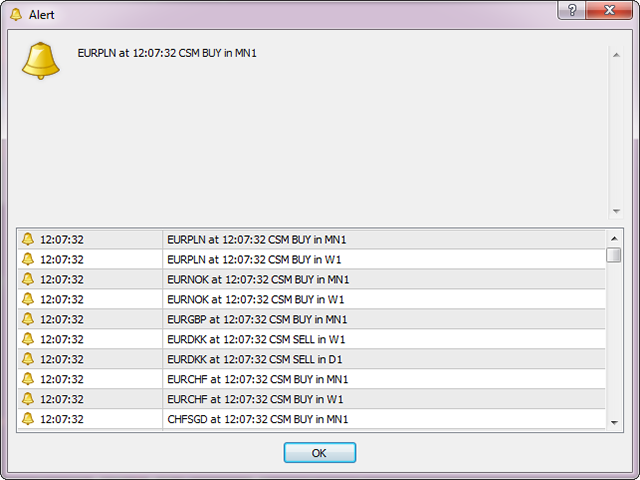
this dashboard is an alarming scanner too, it will scan all the pairs and selected time frame and will alert you if a new condition formed.
How It Work?
each setup or signal have it's own principles for example as a "Reentry Dashboard", it
automatically calculate the slope of the moving average and when price comes near the MA it will show by color and alarm (when MA touch, it will
show a red box as a sell side). or as a "
Extreme" Finder Dashboard, it automatically check the WMA5 and Bollinger Band position on previous closed bar. or an example for "REE
Dashboard": if you see a red color on H1, it means there is a reentry sell in H4, Extreme in H1, Extreme in M15. if there is no opportunity the
color would be Gray.
you can choose your pairs list to automatically use Market Watch or from manual created list. also in the MarketWatch mode as you
know, we can customize our market watch by keyboard. (move a pair up/down with ctrl + arrow keys, hide a symbol by Delete, save the list by
rightClick> sets)
Features:
*All the boxes are clickable so you can simply go to your intended pair or time frame with only one click
*All
possible types of alerts (popup-push notifications-email)
*You can choose your pairs list to automatically use Market Watch or from manual created list
*All
dashboard features are adjustable. (such as: the Y distance of the entire dashboard, text font size, the height of boxes and the Y distance
between boxes, box colors)
*You can show or hide the time frames that you want.
*You can show or hide the pairs that
you want (by set your desire market watch list) , also you can limit the number of pairs in dashboard (suitable for slow PCs)
*Never miss a Setup or Signal of the BBMA System again - "MultiPair and
MultiTimeframe alert Scanner"
Inputs:
Pip_distance: the acceptable distance between Moving Average and price to show sell or buy opportunity.
CandleID: you
can choose the bar number that you want to recognize the setup in, 0- means current open candle 1- means previous closed candle, so if
you want to be alerting on touch set this parameter to 0.
you can see the full input parameters in the screenshot.
MiddBB_Filter: this
parameter is using to apply middle bollinger band filter for the "Reentry" section, by setting this parameter to "True", for a
Reentry buy price must be above midBB also and wise versa.
Stoch_Filter: based on my researchs we can combine Reentry with Stochastic to get more accurate Reentrys, if you set
this parameter to "True", this special filter will apply for recognizing Reentrys.
these types of filtered Reentrys are most suitable for scalping on Reentrys.
"please note that Multipairs or Multi timeframes indicators, does not work on the strategy tester, so trying this indicator on demo
tester will result in nothing"
feel free to text me if you need any other modifications to this indicator.




 nload="if(window.viewGallery_GalleryManager) viewGallery_GalleryManager.ImageonLoad(this,7);" />
 nload="if(window.viewGallery_GalleryManager) viewGallery_GalleryManager.ImageonLoad(this,8);" />
 nload="if(window.viewGallery_GalleryManager) viewGallery_GalleryManager.ImageonLoad(this,9);" />
 nload="if(window.viewGallery_GalleryManager) viewGallery_GalleryManager.ImageonLoad(this,10);" />
状态:离线 发送信件 在线交谈
姓名:顺水的鱼(先生)
职位:投机客
电话:18391752892
手机:18391752892
地区:默认地区
地址:西安市高新区软件园
邮件:3313198376@qq.com
QQ:3313198376
微信:18391752892
阿里旺旺:顺水的鱼waterfish
Skype:3313198376@qq.com