

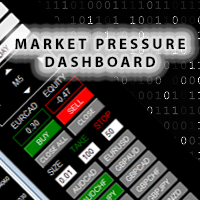
Market Pressure Dashboard
Market Pressure Dashboard is a new generation utility.
Its main function is to assist you and give you operational ideas optimizing your analytical work.
Using this utility you could monitor a lots of financial instruments (max 28 symbols FOREX) in a very simple way.
The Market Pressure indicator allows you to customize the internal list of the symbols to be monitored.
The opening function and position management with this panel will be much more comfortable and navigation charts very powerful.
You can choose the Price Action method to apply to EA in order to be able to control different operating models.
This tool really shows a great ally to work better and more efficiently.
Functionalities and Graphic objects on chart:
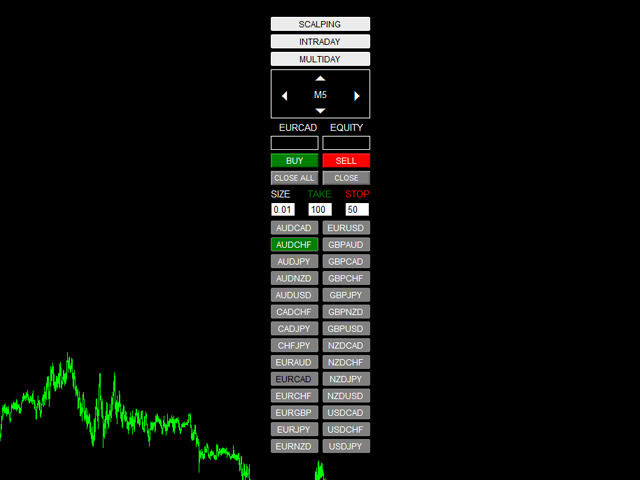
- SCALPING STRATEGY (enable/disable):
- When TF M1 - M5 - M15 on a symbol are in according with Price Action strategy, the button of symbol will change color in Long or Short color
- INTRADAY STRATEGY (enable/disable):
- M30 - H1- H4 on a symbol are in according with Price Action strategy, the button of symbol will change color in Long or Short color
- MULTIDAY STRATEGY (enable/disable):
- D1- W1- MN on a symbol are in according with Price Action strategy, the button of symbol will change color in Long or Short color
- Rectangles Time frame
- Up Arrow to change TF
- Down Arrow to change TF
- Left Arrow to reduce Chart Size
- Right Arrow to increase Chart Size
- EQUITY Symbol: show Equity for orders open with Magic Number=input and symbol=Symbol of chart
- EQUITY Total: show Equity for ALL orders open with Magic Number=input
- BUY-SELL BUTTON: Opens position on the chart symbol
- CLOSE ALL BUTTON: Closes all positions opened with Dashboard PA (with MagicNumber use in input)
- CLOSE BUTTON: Closes only the positions relative to symbol opened with Dashboard PA (with MagicNumber use in input)
- SIZE: for every order, you can edit directly into field to change default in input
- TARGET-STOP: in PIPS, you can edit directly on chart to change default in input
- BUTTON SYMBOL: button relative to symbol chosen in input (from 1 to 28 symbols)
Click on button to open relative chart (new chart or change the current chart with the template choose in input)
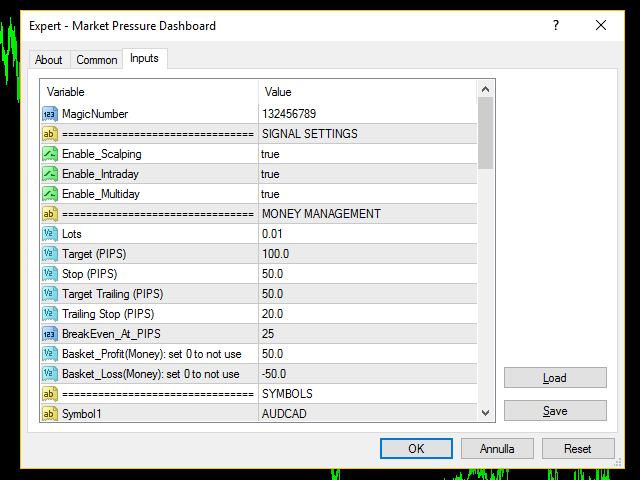
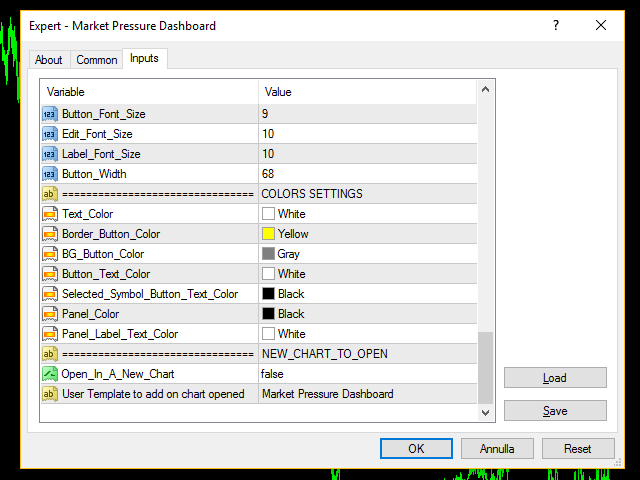
Input Values:
- MagicNumber
- SIGNAL SETTINGS
- Enable_Scalping (true/false) = Enable/Disable Scalping Strategy
- Enable_Intraday (true/false) = Enable/Disable Intraday Strategy
- Enable_Multiday (true/false) = Enable/Disable Multiday Strategy
- MonEY MANAGEMENT
- Lots (for every symbol)
- Target (PIPS)
- Stop (PIPS)
- Target_Trailing in PIPS (when order reaches this target, EA moves StopLoss at actual price-Trailing Stop) (0 to not use)
- Trailing Stop (PIPS)
- BreakEven_At_PIPS (when order reaches this target, EA moves StopLoss at BE) (0 to not use)
- Basket_Profit(Money): set 0 to not use (EA close ALL order when DASHBOARD EQUITY is > Basket_Profit)
- Basket_Loss(Money): set 0 to not use ( EA close ALL order when DASHBOARD EQUITY is < Basket_Loss)
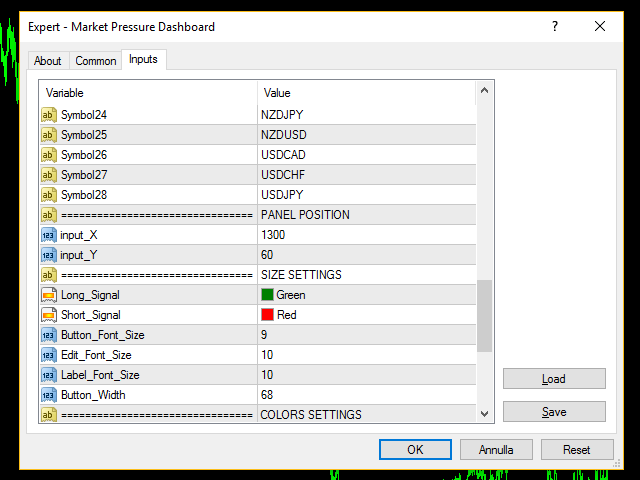
- SYMBOLS (28 symbols FOREX)
- PANEL POSITION
- input_X
- input_Y
- SIZE SETTINGS
- Button_Font_Size
- Edit_Font_Size
- Label_Font_Size
- Button_Width
- COLORS SETTINGS
- Long_Signal (button of symbol changes color when the signal is showed)
- Short_Signal (button of symbol changes color when the signal is showed)
- Text_Color
- Border_Button_Color
- BG_Button_Color
- Button_Text_Color
- Selected_Symbol_Button_Text_Color
- Panel_Color
- Panel_Label_Text_Color
- NEW_CHART_TO_OPEN:
- Timeframe = Timeframe to open chart when click on Symbol buttons
- User Template to add on chart opened (saved on your MT4 directory)
联系方式
公司:顺水的鱼外汇EA
状态:离线 发送信件 在线交谈
姓名:顺水的鱼(先生)
职位:投机客
电话:18391752892
手机:18391752892
地区:默认地区
地址:西安市高新区软件园
邮件:3313198376@qq.com
QQ:3313198376
微信:18391752892
阿里旺旺:顺水的鱼waterfish
Skype:3313198376@qq.com
状态:离线 发送信件 在线交谈
姓名:顺水的鱼(先生)
职位:投机客
电话:18391752892
手机:18391752892
地区:默认地区
地址:西安市高新区软件园
邮件:3313198376@qq.com
QQ:3313198376
微信:18391752892
阿里旺旺:顺水的鱼waterfish
Skype:3313198376@qq.com