


Lot calculator tool
This tool helps you to automatically calculate and manage risk, conveniently place orders visually, schedule orders, trail stops, move them to break-even, manually test strategies and more.
Features
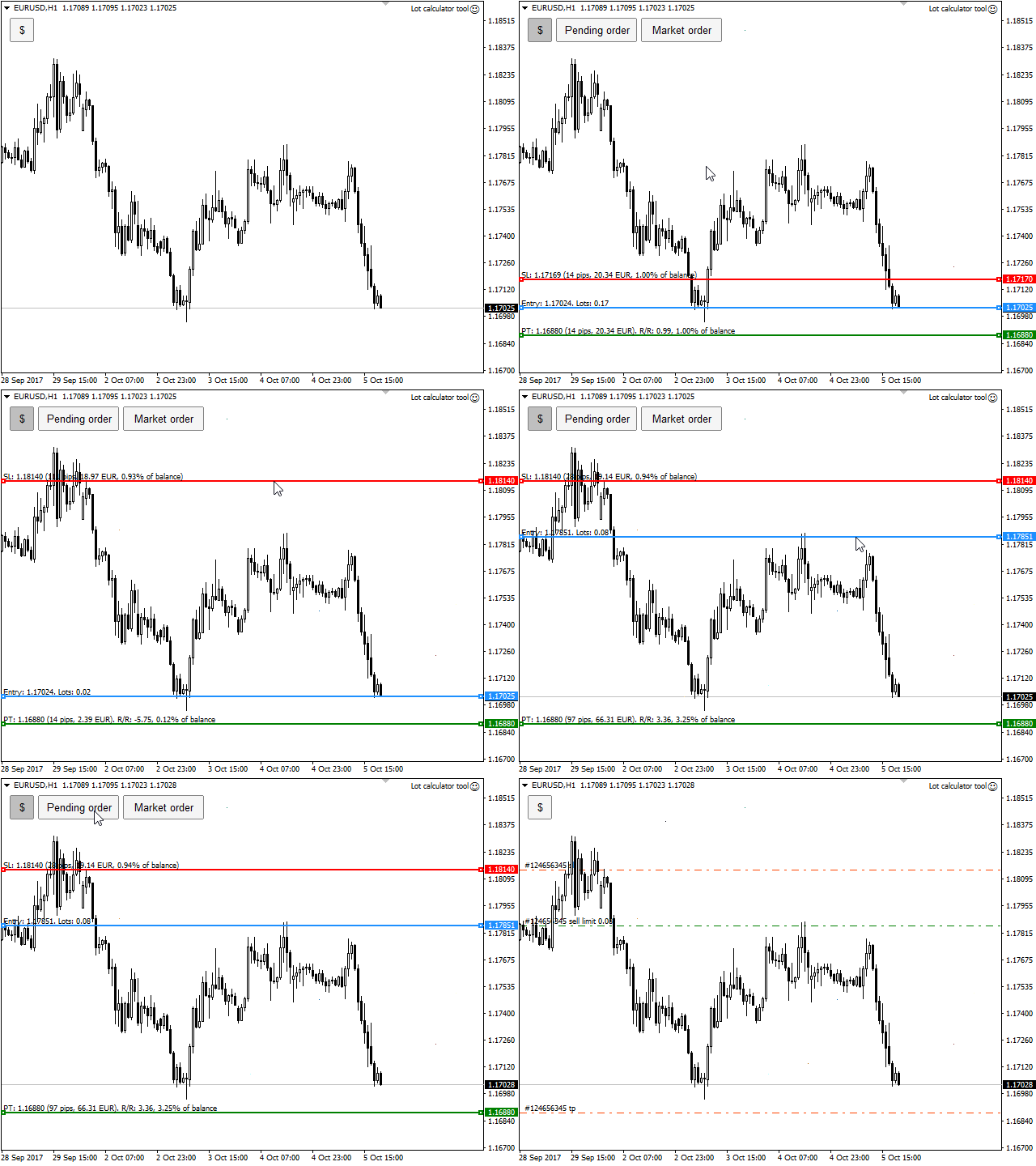
- Place market or pending orders using draggable lines
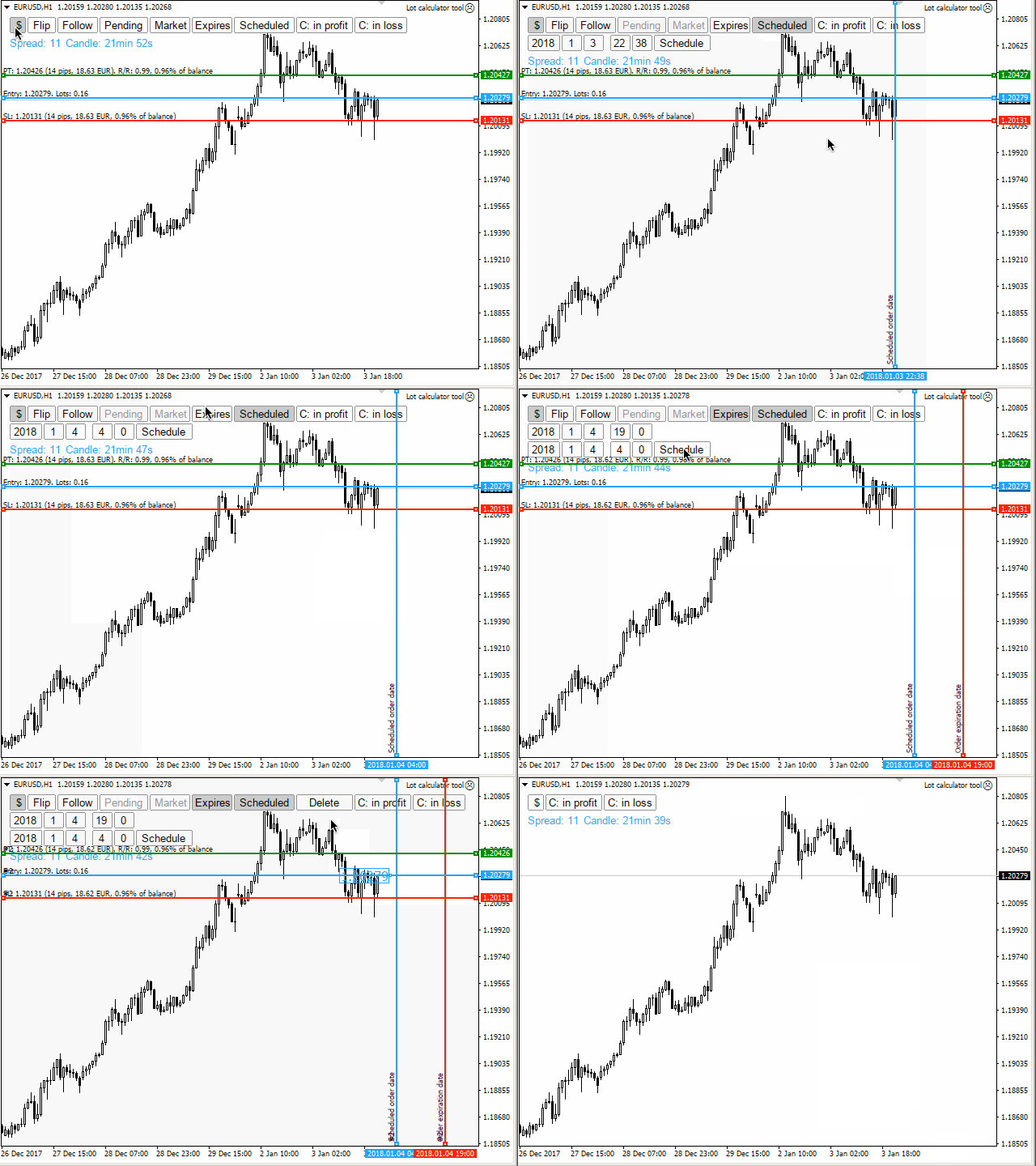
- Schedule orders
- Calculate and limit risk using various methods
- See current spread
- See time till next candle
- Set custom order comments
- Trail stops
- Move stops to break-even
- See order profit/loss in pips
- Various actions for closing orders
- Control the tool using hotkeys
- Toggle trade levels
- Manually test strategies using this tool tester mode with controllable speed
Settings
- Risk settings
- Preferred percentage risk per trade - tool will calculate lot size to match this risk percentage
- Lot calculation mode - possible modes: current balance / current equity / balance at defined past / fixed lot size
- Defined past period - possible periods: day / week / month
- Past period multiplier - the bigger, the further to the past
- Lot size for fixed mode
- Split risk for multiple targets
- Orders settings
- Magic number
- Maximum allowed slippage
- Order comment - limited to 31 characters. Possible wildcards: [currency], [balance], [equity], [risk_percentage], [risk_reward], [risk_money], [risk_pips], [profit_money], [profit_pips], [lots]
- Allow to change default order comment - adds an input to UI
- Log order send events
- Allow setting an expire date for orders
- Allow scheduling orders
- Virtual levels settings
- Scheduled order price label size
- Break-even settings
- Move stops to break-even at certain level
- Break-even mode - possible modes: when in profit by given pips, if away from target by given pips, if given percentage of target reached
- Break-even activation pips / % - depends on chosen mode
- Move to break-even by given pips above entry line
- Stop trailing settings
- Trail stops
- Trail only after stops have been move to break even, if be used
- Trailing stop mode - possible modes: fixed pips, ATR, moving average
- Trailing stop fixed pips
- Trailing stop ATR period
- Trailing stop ATR shift
- Trailing stop distance multiplier - does not apply to MA mode, but useful for setting 2 ATR distance
- Trailing stop MA mode, applied price, period, shift
- Prevent stops trialing until specified pips of profit reached
- Pips of profit to reach before trailing stops - if above enabled
- Prevent stops trailing until specified percentage of target reached
- Percentage of target to reach before trailing stops - if above enabled
- Order limiter settings
- Limit trades if lost to many trades in a row per day
- Limit trades if too big % of account has been lost per day
- Limit trades if too big % of account has been lost per week
- Limit trades if too much will be at risk at the moment
- Daily loss in a row limit
- Daily account loss % limit
- Weekly account loss % limit
- Total risk of equity % limit
- Lines settings
- Automatically choose initial lines placement (sell / buy) - uses price and moving average to decide
- Manual default start position for lines - if above disabled
- Initial distance from current price mode - possible modes: fixed pips, ATR
- Initial distance parameter (ATR period / pips)
- Line size, style
- Use target line
- Display "Add target" button
- Prevent from moving stops too far, thus exceeding defined risk
- Display monetary amounts on lines
- Display balance percentages on lines
- Display scheduled order lines
- Scheduled order line style
- Other features
- Display lines flipper button
- Display "Follow price" button
- Show "Close all" button
- Show "Close pending" button
- Show "Close opened" button
- Show "Close in profit" button
- Show "Close in loss" button
- Display only one order button
- Display current spread
- Display time till next candle
- Display Ask line by default
- Display Bid line by default
- Display order profit in pips
- Display order close button
- Screenshots
- Color settings
- Color for lines, buttons, inputs and other UI elements
- Hotkeys settings
- Enable hotkeys
- Show lines hotkey
- Hide lines
- Toggle trade levels
- Tester settings
- Initial tester speed
- UI settings
- Chart corner
- UI on top
- Compact mode
important: if order limiters are used, make sure that your Account history tab is not filtered and displays all of the history.
important: do not have more than one EA enabled for the same symbol with scheduled orders enabled. This might cause more than one order being sent to broker!

联系方式
公司:顺水的鱼外汇EA
状态:离线 发送信件 在线交谈
姓名:顺水的鱼(先生)
职位:投机客
电话:18391752892
手机:18391752892
地区:默认地区
地址:西安市高新区软件园
邮件:3313198376@qq.com
QQ:3313198376
微信:18391752892
阿里旺旺:顺水的鱼waterfish
Skype:3313198376@qq.com
状态:离线 发送信件 在线交谈
姓名:顺水的鱼(先生)
职位:投机客
电话:18391752892
手机:18391752892
地区:默认地区
地址:西安市高新区软件园
邮件:3313198376@qq.com
QQ:3313198376
微信:18391752892
阿里旺旺:顺水的鱼waterfish
Skype:3313198376@qq.com