


Arbitrage Visualiser Pro
We present you an effective software solution for arbitrage between brokers.
The Arbitrage on the FOREX market became widespread due to decentralization. There are many liquidity providers, whose quotes differ for various reasons. By tracking the dynamics of changes in the quotes of different brokers, it is possible to determine the delayed and leading brokers, thereby predicting the future prices of the delayed broker for a short time. Knowing these prices and using efficient built-in software filters, it is possible to perform arbitrage trading operations.
The main advantage of our trading complex is the usage of only the regular means of the MQL4, so there is no need to install additional programs on your computer. It is sufficient to install the EA on different terminals of different brokers, specify the operation mode: trading or slave mode, to configure the intuitive parameters in the convenient panel and start the analysis and/or trading.
The system has a number of bonuses:
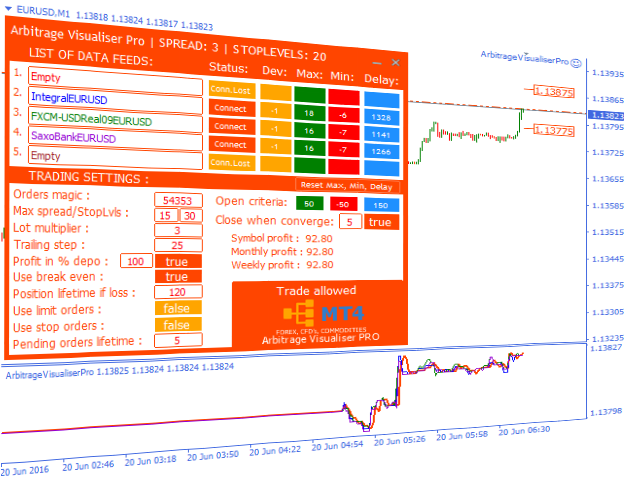
- Convenient user panel which displays all settings.
- "Hot" change of the settings, without restarting the EA. The panel stores the settings for each symbol and loads them at a restart.
- Additional indicator which displays the quotes of the current and all connected brokers in different visualization modes.
- Possibility of arbitrage between all available instruments, including FOREX, CFD's, Commodities.
- Connection of up to five brokers simultaneously into one Mater panel, with automatic signal sorting and trading using the best of them.
- Possibility of trading limit orders without slippages both in the normal Bid-Ask mode and within the spread on the accounts with zero stop levels.
- Control of the slave servers freezing, therefore, protection against false trades when the quotes become delayed due to freezing.
- Measurement of the quotes delay time in milliseconds and the ability to set the minimum threshold, below which the trades will not be opened.
Installation order
- Attach the EA in the “Trading account” mode to the chart of the required symbol of the selected broker (supposedly delayed). Trading will be performed on the delayed broker. The main panel will appear on the chart. Add the free Arbitrage Visualiser Pro Indicator to the chart.
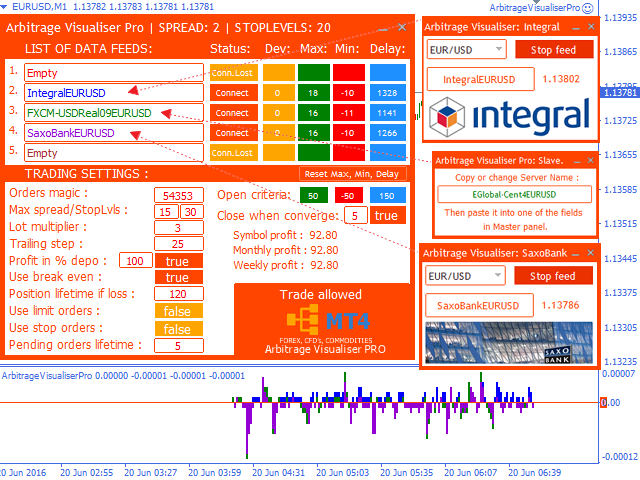
- Select one or more slave brokers, install their terminals beforehand. Attach the robot in the “Slave account” mode to the charts of the same symbols to all the slave brokers. Edit the fields with the server name as you wish, for ease of display, or leave unchanged.
- Copy the names of the slave servers to the fields of the main panel. If everything was done right, the “Connect” status will be displayed, values will appear in the fields Dev (deviation), Мax, Min and Delay(delay in milliseconds), also the indicator will start displaying the current prices of all added servers.
You can perform these operations for any symbol of any broker, without any limitations.

状态:离线 发送信件 在线交谈
姓名:顺水的鱼(先生)
职位:投机客
电话:18391752892
手机:18391752892
地区:默认地区
地址:西安市高新区软件园
邮件:3313198376@qq.com
QQ:3313198376
微信:18391752892
阿里旺旺:顺水的鱼waterfish
Skype:3313198376@qq.com