


Control Trading Williams Filtered
This Expert Advisor is based on overbought/oversold conditions to enter orders using Williams% indicator.
Orders are opened when Williams% crosses with an indicator signal component (simple moving average).
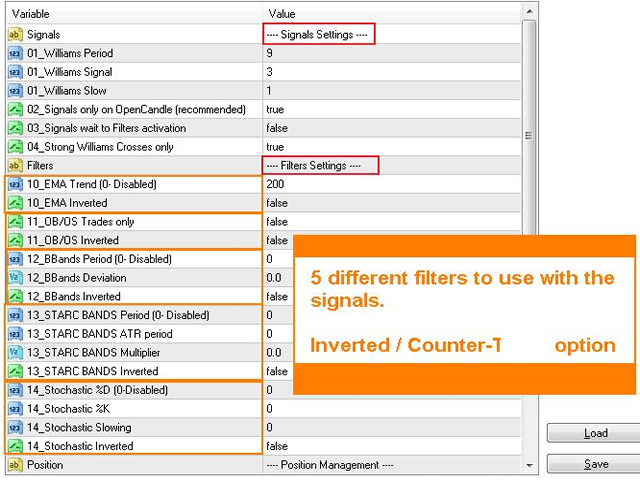
This system includes five filters so that you can adjust the strategy to different market conditions.
Parameters
Signals Settings
- 01_Williams Period. Williams% period.
- 01_Williams Signal. Williams% signal period.
- 01_Williams Slow. Slow period.
- 02_Signals only on OpenCandle (recommended). If true, only trades when a new candle opens.
- 03_Signals wait to Filters activation. If true, orders wait to be open when the filters confirm the signal.
- 04_Strong Williams Crosses only. Uses three candles to confirm Williams signals instead of two candles.
Filters Settings
- 10_EMA Trend (0 - Disabled). EMA Period to filter signals according to trend. Period 0 does not filter any signal.
- 10_EMA Inverted. If true, filter acts like counter-trend, allows buy orders when prices are below EMA and allows sell orders when price above EMA.
- 11_OB/OS Trades only. If true, it only opens orders when signals occur in OverBought and OverSold(<-80) levels.
- 11_OB/OS Inverted. If true, filter will act as counter-trend, allow sell orders when overbought zone and buy orders when oversold.
- 12_BBands Period (0 - Disabled). Bollinger Bands period. It allows trading only outside the bands, allows buys above the bands and sells bellow the bands. Period 0 does not filter any signal.
- 12_BBands Deviation. Bollinger Bands deviation.
- 12_BBands Inverted. If true, filter will act counter-trend, allow buys when price is below bands and sells when price is above bands.
- 13_STARC BANDS Period (0 - Disabled). STARC Bands EMA Period. Similar to Bollinger Bands using ATR instead of standard deviation. Period 0 does not filter any signal.
- 13_STARC BANDS ATR period. Bands ATR Period.
- 13_STARC BANDS Multiplier. ATR multiplier to calculate bands.
- 13_STARC BANDS Inverted. If true, filter will act as counter-trend, allow to sell when price is above the bands and buy orders when price is below the bands.
- 14_Stochastic %D (0 - Disabled). Stochastic %D period. This filter only allows buys when Stochastic is above signal and sells when Stochastic is below signal. Period 0 does not filter any signal.
- 14_Stochastic %K. Stochastic %K period.
- 14_Stochastic Slowing. Stochastic slow period.
- 14_Stochastic Inverted. If true, this filter acts counter-trend, allows buy when Stochastic is below signal and sell when Stochastic is above signal.
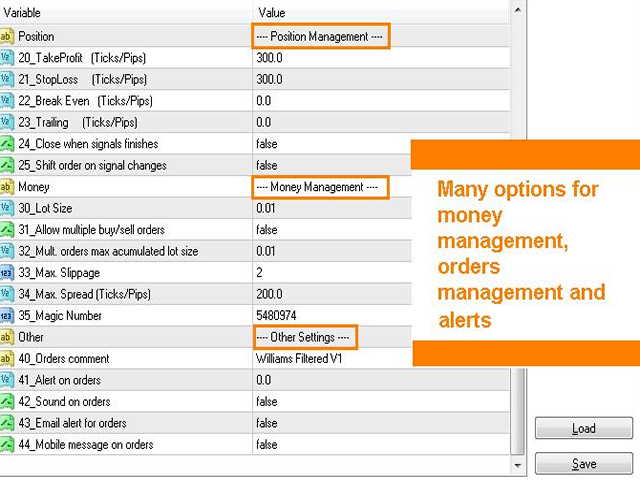
Position Management
- 20_TakeProfit (Ticks/Pips). Take profit level in broker ticks. 0 will not use take profit.
- 21_StopLoss (Ticks/Pips). StopLoss level in broker ticks. 0 will not use stop loss.
- 22_Break Even (Ticks/Pips). Breakeven level in broker ticks. 0 will not use breakeven.
- 23_Trailing (Ticks/Pips). Trail distance in broker ticks. 0 will not trail.
- 24_Trailing EMA Period (0 - Disabled). Trail using EMA. 0 will not trail.
- 24_Trailing EMA (Ticks/Pips). Trail distance to EMA in broker ticks.
- 25_Signal finish protection (Ticks/Pips). Stop Loss distance when Williams signal changes trend, in broker ticks.
- 24_Close when signals finishes. Close orders when Williams signal changes trend.
- 25_Shift order on signal changes. If true, buy signals will close any open sells and sell signals will close any open buys.
Money Management
- 30_Lot Size. Lot size
- 31_Allow multiple buy/sell orders. Allow simultaneous buys and simultaneous sell orders.
- 32_Mult. orders max acumulated lot size. Maximum lot size to simultaneous Buy orders and Sell orders, too.
- 33_Max. Slippage. Maximum slippage accepted when sending orders.
- 34_Max. Spread (Ticks/Pips). Maximum spread allowed when sending orders.
- 35_Magic Number. Magic number to allow several systems work together.
Other Settings
- 50_Orders comment. Comment shown on orders.
- 51_alert on orders. Show alert on orders.
- 52_Sound on orders. Play a sound on orders.
- 53_Email alert for orders. Send email on orders (MT4 configuration).
- 54_Mobile message on orders. Send mobile notification on orders (MT4 configuration).
We strongly recommend to backtest first to get best EA sets/parameters for every symbol and then use on demo accounts for a period of time before using this EA on real accounts.

ta itemprop="image" content="https://c.mql5.com/31/119/williams-filtered-screen-9831.png" />
联系方式
公司:顺水的鱼外汇EA
状态:离线 发送信件 在线交谈
姓名:顺水的鱼(先生)
职位:投机客
电话:18391752892
手机:18391752892
地区:默认地区
地址:西安市高新区软件园
邮件:3313198376@qq.com
QQ:3313198376
微信:18391752892
阿里旺旺:顺水的鱼waterfish
Skype:3313198376@qq.com
状态:离线 发送信件 在线交谈
姓名:顺水的鱼(先生)
职位:投机客
电话:18391752892
手机:18391752892
地区:默认地区
地址:西安市高新区软件园
邮件:3313198376@qq.com
QQ:3313198376
微信:18391752892
阿里旺旺:顺水的鱼waterfish
Skype:3313198376@qq.com