

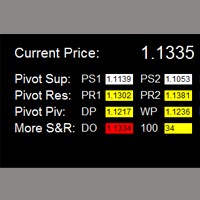
Critical Support and Resistance Panel
Critical Support and Resistance is an intuitive, and handy graphic tool to help you to monitor and manage critical support and resistance price point easily with one glance to know status of all important S&R.
Price is likely to pullback or breakout at important support and/or resistance. This indicator is designed to help you monitor these critical support and resistance area such as pivot support1/2/3, pivot resistance1/2/3, daily/weekly/monthly pivot, daily open, and 100 point (e.g. 1.1300 of EURUSD; 118.00 of EURJPY).
once price moves close to these important support and resistance within the warning area (warning area range is adjustable), alert or notification would be sent out, and indicator panel will be repainted to be red to make it noticeable. So you are free from watching and monitoring chart all day long, and easily manage your system with this indicator.
Features
- Ability to select usage of alert/notification function.
- Adjustable warning range for each type of critical support/resistance.
- Ability to select which critical support/resistance to use, by default, all of them are selected.
- Adjustable indicator panel position
Panel Object
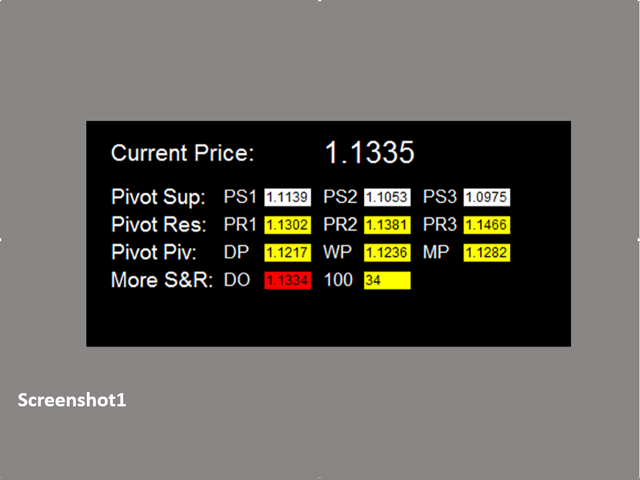
Refer to screenshot1
- If support/resistance is not selected/used, cell will be repainted to be white
- If support/resistance is selected/used
- Price is out of warning zone, cell is repainted to be yellow
- Price is within warning zone, cell is repainted to be red
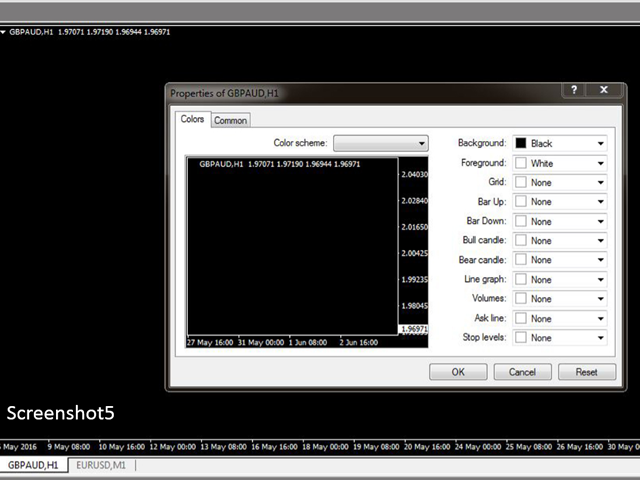
- To make panel looks clear and neat, it’s recommended to use blank template, please refer to screenshot2.
Input Parameters
- Send_alert
- True: send alert once price moves to area within warning zone
- False: no alert will be sent
- Send_Notification
- True: send notification once price moves to area within warning zone
- False: no notification will be sent
- Use Pivot Support
- True: pivot support cell panel will be repainted to be red, and alert/notification will be sent once price moves to area within pivot support warning zone
- False: no action will be triggered
- Pivot Support Warning Zone: the range of pivot support warning zone in unit of pips. e.g. If pivot R1 is 1.1300, and Pivot Support Warning Zone is set to be 10 (pips), then the Pivot Support Warning Zone would be the range from 1.1290 (1.1300 -10pips) to 1.1310 (1.1300 + 10pips).
- Use Pivot Resistance
- True: pivot resistance cell panel will be repainted to be red, and alert/notification will be sent once price moves to area within pivot resistance warning zone
- False: no action will be triggered
- Pivot Resistance Warning Zone: the range of pivot resistance warning zone in unit of pips. Please refer to example of Pivot Support Warning Zone.
- Use Daily/Weekly/Monthly Pivot
- True: daily/weekly/monthly pivot cell panel will be repainted to be red, and alert/notification will be sent once price moves to area within daily/weekly/monthly pivot warning zone
- False: no action will be triggered
- Daily/Weekly/Monthly Pivot Warning Zone: the range of daily/weekly/monthly pivot warning zone in unit of pips. Please refer to example of Pivot Support Warning Zone.
- Use Daily Open
- True: daily open cell panel will be repainted to be red, and alert/notification will be sent once price moves to area within daily open warning zone
- False: no action will be triggered
- Daily Open Warning Zone: the range of daily open warning zone in unit of pips. Please refer to example of Pivot Support Warning Zone.
- Use Buy/Sell at 100
- True: '100' cell panel will be repainted to be red, and alert/notification will be sent once price moves to area within '100' warning zone
- False: no action will be triggered
- Buy/Sell at 100 Warning Zone: the range of 100 warning zone in unit of pips. Please refer to example of Pivot Support Warning Zone.
- X_axis:dashboard x position
- Y_axis: dashboard x position
Note
- once alert/notification of a particular support/resistance has been sent, the next alert/notification of that support/resistance will be sent after 5 minutes upon warning zone. The alert and notification are implemented in this way to make sure you receive them once during a certain period instead of numerous alerts/notification coming to you continuously.
If you have any customized request and/or suggestion, please feedback to me.
状态:离线 发送信件 在线交谈
姓名:顺水的鱼(先生)
职位:投机客
电话:18391752892
手机:18391752892
地区:默认地区
地址:西安市高新区软件园
邮件:3313198376@qq.com
QQ:3313198376
微信:18391752892
阿里旺旺:顺水的鱼waterfish
Skype:3313198376@qq.com