


Exit with Trend Line
The Exit with Trend Line is a program for closing trades after the price crosses a custom trend line. Used for closing trades based on inclined support and resistance levels.
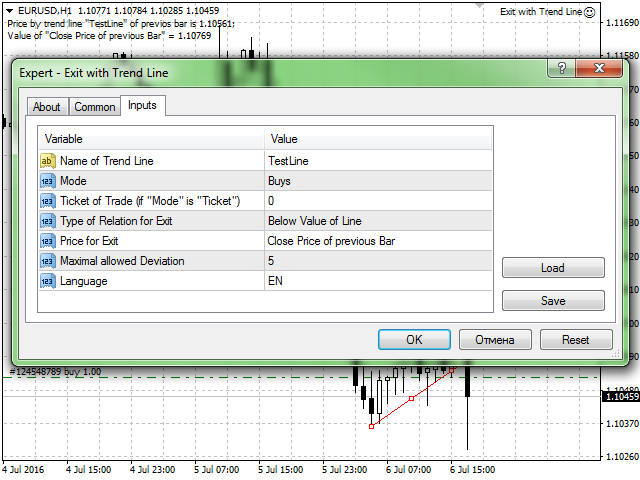
Specify in parameters the name of the trend line, crossing type (bottom-up or top-down), price type (see next), type of orders (buys or sells) or trade ticket. As soon as the specified crossing occurs, the robot closes the required trades.
Input Parameters
- Name of Trend Line - name of the trend line.
- Mode – mode of determining the trades for closing. Possible values (drop-down list):
- Ticket - ticket (the ticket itself is specified in the next parameter);
- Buys - market buys;
- Sells - market sells.
- Ticket of Trade - ticket of a specific trade. Used only if "Mode" is set to "Ticket".
- Type of Relation for Exit - type of price location relative to the level for closing trades. Possible values:
- Above Value of Line - above the line value.
- Below Value of Line – below the line value.
- Price for Exit – price type for closing trades. Possible values:
- Current Price (Bid) - current Bid price;
- Open Price of current Bar - opening price of the current bar;
- Close Price of previous Bar - closing price of the previous bar;
- Open Price of previous Bar - opening price of the previous bar;
- High Price of previous Bar - High price of the previous bar;
- Low Price of previous Bar - Low price of the previous bar;
- Median Price of previous Bar, (h+l)/2 - median price of the previous bar, (high+low)/2;
- Typical Price of previous Bar, (h+l+c)/3 - typical price of the previous bar, (high+low+close)/3;
- Weighted Price of previous Bar, (h+l+c+c)/4 - weighted closing price of the previous bar, (high+low+close+close)/4;
- Maximal allowed Deviation – level of maximum allowed price deviation in case of requotes;
- Language - Expert Advisor language. Possible values (drop-down list):
- EN - English (default);
- RU - Russian.
Attention! The product is designed to operate in real time, as it does not open trades but only maintains them.
Special operation mode is provided for the tester: at startup, if there are no open trades, a trade of the type set in the product parameters is opened. Besides, the utility works in the tester only if visual testing is used. Otherwise, user cannot apply a necessary trend line to the chart window.


状态:离线 发送信件 在线交谈
姓名:顺水的鱼(先生)
职位:投机客
电话:18391752892
手机:18391752892
地区:默认地区
地址:西安市高新区软件园
邮件:3313198376@qq.com
QQ:3313198376
微信:18391752892
阿里旺旺:顺水的鱼waterfish
Skype:3313198376@qq.com