

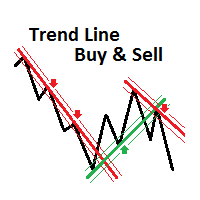
Trend Line Buy Sell Indicator
This is a BUY/SELL indicator with voice alert based on user drawn trend lines (max. of 10 TLs for each type of trend line, up or down). It works on all timeframes and currencies. Signals are generated by the price entering in a user defined Trend Line upper or lower price range band and closing after that above or below the upper or lower price band.
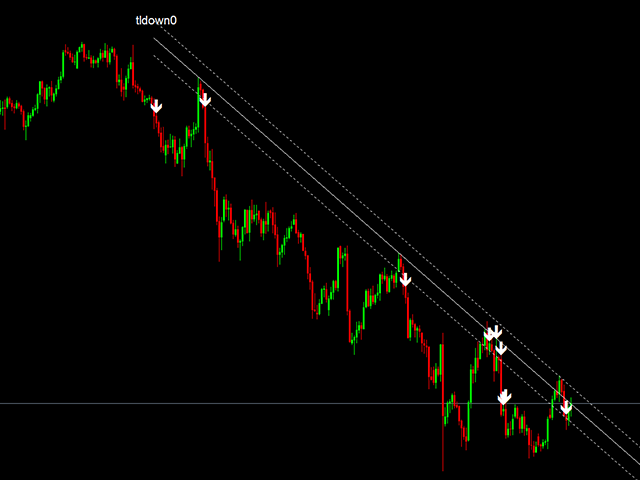
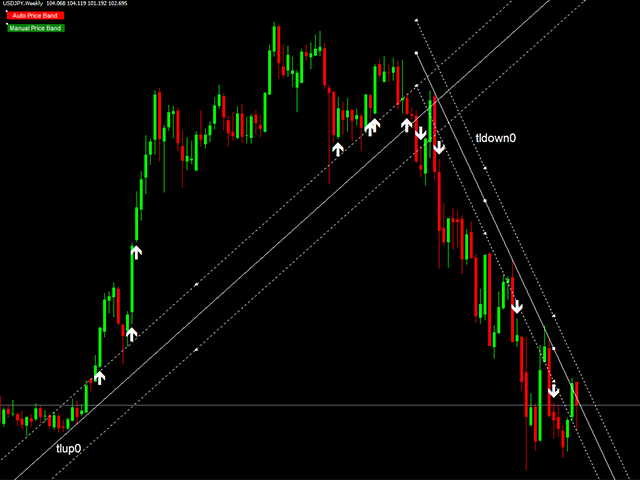
Trend lines are drawn manually by the user and can be horizontal support or resistance lines (but drawn also as angled trend lines and not horizontal lines). The names for the Up and Down trend lines are mandatory input parameters and should be entered by the user in the input parameters provided. Indicator can use a maximum of 10 trend lines for each trend line type, up or down. When trend lines are manually added on the chart, they should be named with the name provided in the input parameter + an index from 0 to 9. For example, if the name for the Up trend line was provided as "tlup" in the indicator's input parameter, when Up trend lines are drawn manually on the chart, they should be named "tlup0", "tlup1", ..., "tlup9". Similar for down trend lines, if the name for the Down trend line was provided as "tldown" in the indicator's input parameter, when Down trend lines are drawn manually on the chart, they should be named " tldown0", "tldown1", ..., "tldown9".
Trend line's price range bands are drawn automatically initially based on the setting selected (ATR, percent or points) but they can be manually adjusted by the user after that. User should click on the "Manual Price Band" button (background color for the button will change from red to green and upper and lower TL band lines will be enabled) and using the middle anchor point of the upper or lower price band line, adjust using the mouse the desired distance from the trend line. Both upper and lower price range bands will be adjusted based on the user change when the first tick is received by the chart. When "Auto Price Band" button is clicked, the price range bands will be automatically redrawn when the first tick is received based on the input parameter entered (ATR, percent or points). Price range bands will also be automatically redrawn with the income of the first tick if a trend line was manually redrawn/repositioned by the user. You can move around with the mouse the "Manual Price Band" and "Auto Price Band" buttons after you select the button you want to reposition (if not already selected).
The BUY signal is triggered when the previous bar has the Low or the Close in the upper price range band and the current bar closes above the upper limit of the upper price range band. The SELL signal is triggered when the previous bar has the High or the Close in the lower price range band and the current bar closes below the lower limit of the lower price range band.
Recommendations on usage
The strategy to use the indicator is simple, manually draw a maximum of 10 trend lines (can be horizontal support or resistance line) starting in higher timeframes and name the trend lines as explained above. Add the indicator on the chart and open a BUY order when the buy signal is triggered displaying the up arrow on the chart and open a SELL order when the sell signal is triggered displaying the down arrow on the chart. It is not recommended to use this indicator alone... You should combine it with other indicators, candlestick patterns, etc to make your Buy or Sell decision.
Inputs
Up and down trend line names
- Name of the Up trend line - default = "tlup"
- Name of the Down trend line - default = "tldown"
Trend Line price range band settings
- Price Range Band Setting - possible values: NO Band, ATR, Percent, Points - default = ATR Price Band
- Use Auto or Manual Price Band - default = Auto
- Percent to use if price band setting selected = 2 - default = 0.1%
- No of points to use if price band setting selected = 3 - default = 50 Points
- Enable voice alert when signal is triggered - true or false, default = true
Author
George Cosoveanu


状态:离线 发送信件 在线交谈
姓名:顺水的鱼(先生)
职位:投机客
电话:18391752892
手机:18391752892
地区:默认地区
地址:西安市高新区软件园
邮件:3313198376@qq.com
QQ:3313198376
微信:18391752892
阿里旺旺:顺水的鱼waterfish
Skype:3313198376@qq.com