


MEL Buffer Scan
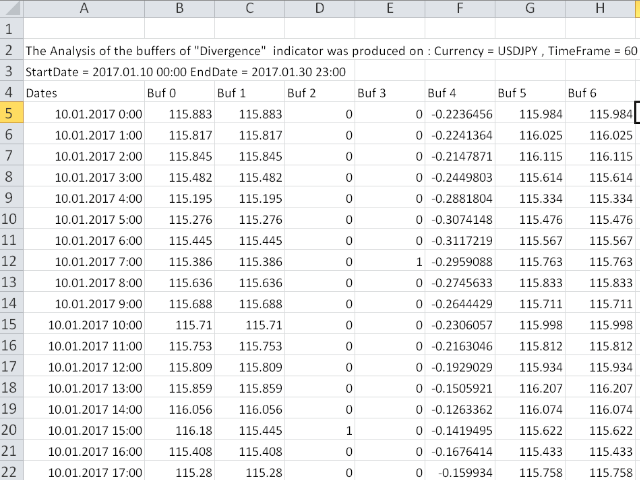
Buffer Scan analyzses your custom indicator buffers with iCustom function on a certain period of history (configurable by the user) and writes buffers’s data to a csv file.The script helps determine buffers’ numbers, through which the indicator transfers any data, for example, the appearance of arrows, a particular color, a certain line and other information.
The utility scans all 512 indicator buffers but it records to a csv file only those of them which have data. If a buffer does not transfer anything to the chart, it is not written to the file. So only data of a few buffers are left in the file.
Settings
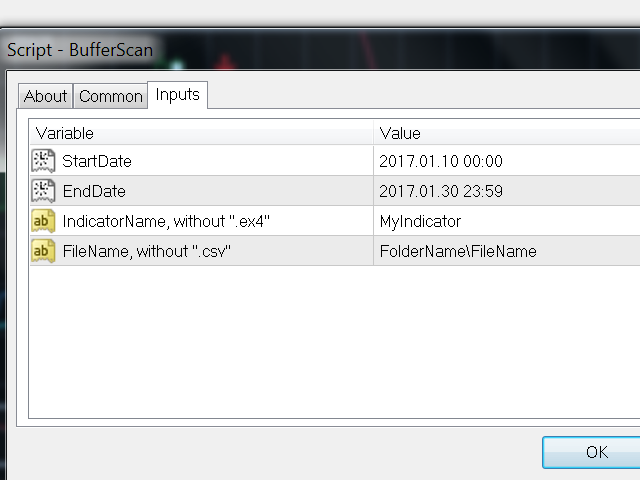
- StartDate - start date for analysis (for example, 2017.01.10 00:00)
- EndDate - end date for analysis (for example, 2017.02.10 23:59)
- IndicatorName - indicator name without .ex4 file extension (for example, MyBestIndicator). The indicator should be in the root of MQL4Indicators folder (without subfolders). Check if there are spaces at the start and at the end of the indicator file name (this happens very rarely). If there are some, remove them directly from the file name (change the name of the indicator file).
- FileName - name of the .csv file for the indicator data and the subfolder name where the indicator will be located. If you only write the file name, it will be located in the root of MQL4Files directory. If you also write the name of a subfolder (for example, MysubfolderMyBestIndicator), the file will be located in MQL4FilesMysubfolder. You can write the file name without the .csv extension. If the file already exists and it is re-recording, it is necessary that it has not been opened in any program.
联系方式
公司:顺水的鱼外汇EA
状态:离线 发送信件 在线交谈
姓名:顺水的鱼(先生)
职位:投机客
电话:18391752892
手机:18391752892
地区:默认地区
地址:西安市高新区软件园
邮件:3313198376@qq.com
QQ:3313198376
微信:18391752892
阿里旺旺:顺水的鱼waterfish
Skype:3313198376@qq.com
状态:离线 发送信件 在线交谈
姓名:顺水的鱼(先生)
职位:投机客
电话:18391752892
手机:18391752892
地区:默认地区
地址:西安市高新区软件园
邮件:3313198376@qq.com
QQ:3313198376
微信:18391752892
阿里旺旺:顺水的鱼waterfish
Skype:3313198376@qq.com