


MultiSymbolRiskManager
Most manual trading strategies are based on multi-instrument portfolio, which may include currencies, metals, stocks, etc. And often there is not enough time to quickly calculate the lot size required to trade each instrument according to your risks.
MultiSymbol Risk Manager
is designed to facilitate the trader's work, as it is able to calculate in a few seconds and display the size of the maximum allowed lot size per deal for each instrument of the portfolio according to your risk management plan. To do this:
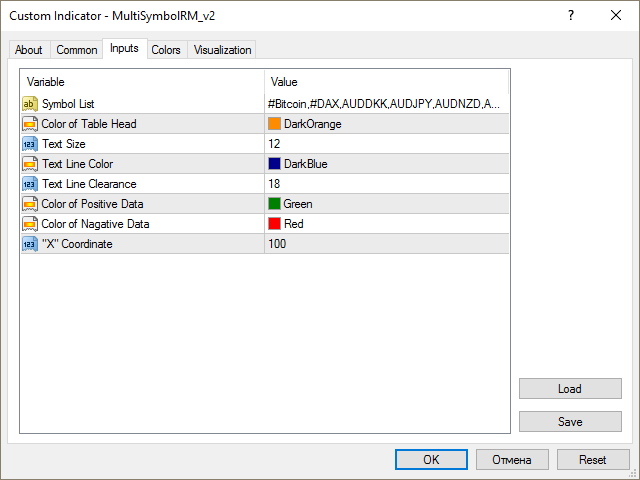
- It is sufficient to make a list of working instruments in the indicator settings (Fig. 1);
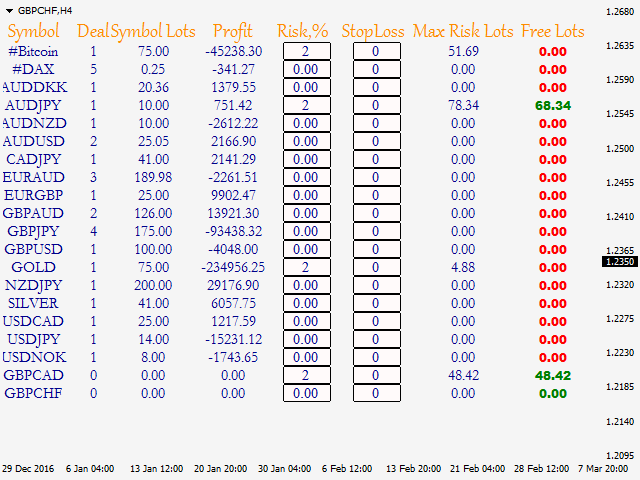
- If your strategy does not involve the use of stop orders, then in the fields of the "Risk" column it is sufficient to enter values (can be integer of fractional numbers) next to each instrument (Fig. 2) or
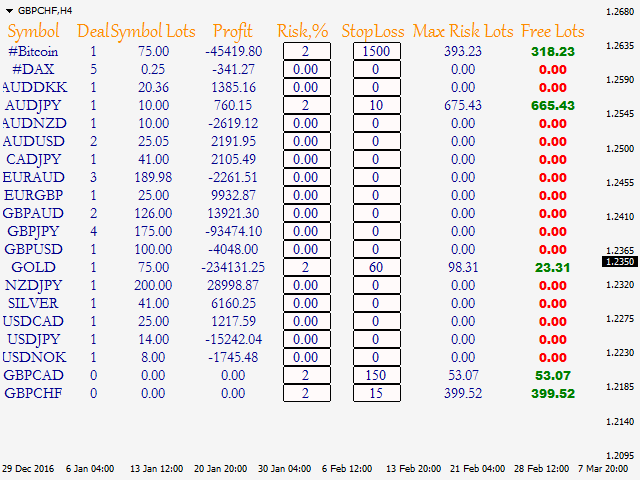
- If you use stop orders, then in the fields of the "Risk" and "Stoploss" (integer only) columns, enter the values and click anywhere on the chart (Fig. 3).
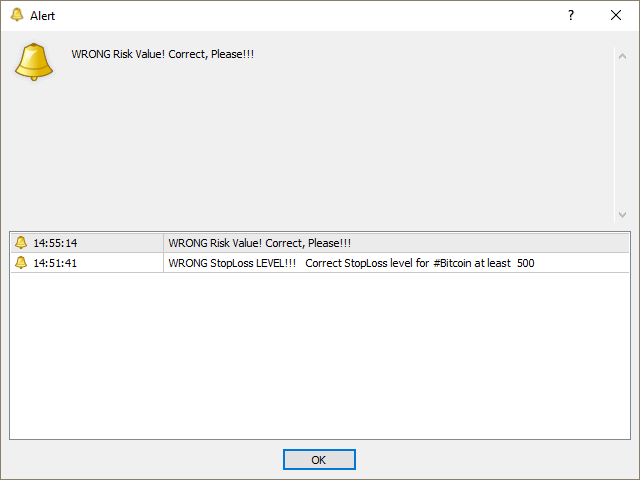
As a result, after a new tick arrives, the indicator will show the maximum allowed lot (Max Risk Lots) for each instrument in the list according to the funds on your account, as well as the number of lots currently available for trading (Free Lots). In case the values of "Risk" (< 0 or > 100) and "Stoploss" (< minimum stops level) are entered incorrectly, the indicator will report an error in Russian or English (if the language of the terminal is not Russian). In the case of the stop loss, it will automatically substitute the minimum value allowed by the broker.
Principle
underlying the indicator is based on using one of the two smallest values at the current moment in calculations - account balance or free margin, which allows managing the account funds with smaller risks. This approach is directly related to the current total profit of all open deals, i.e. the account profit. If the profit is positive, then the balance value is used in calculations; if it is negative or equal to zero (when there are no open trades on the account), the free margin is used.
The calculations also consider the value of spread on each symbol in the list.
Using the displayed data
The display of the calculated data is designed in such a way that there is no need to look into and analyze them for a long time. Everything is simple: if your account has enough funds to perform trades with the specified values of "Risk" and "Stoploss", then a green value is displayed in the Free Lots column next to each symbol. The number itself indicates the lot size that can be used to open one or multiple trades, with the total lot size not exceeding that value. Otherwise, the value of Free Lots will be equal to "0,0" and will have a red color.
Main Parameters
are shown in Figure 1. These are:
- Symbol List - list of the instruments to be used in trading. Specify them separated by commas without spaces!
Be careful when making up the list! GBPUSD,EURUSD,#DAX - correct entry! GBPUSD, EURUSD, #DAX - incorrect!
important! For the correct operation on all instruments that will be used in the "Symbol List", it is necessary for them to be present in the "Market Watch".
状态:离线 发送信件 在线交谈
姓名:顺水的鱼(先生)
职位:投机客
电话:18391752892
手机:18391752892
地区:默认地区
地址:西安市高新区软件园
邮件:3313198376@qq.com
QQ:3313198376
微信:18391752892
阿里旺旺:顺水的鱼waterfish
Skype:3313198376@qq.com