


Alien Invader
Alien Invader is a fully automated Expert Advisor for Forex trading that uses two types of orders: Buy Stop and Sell Stop. Alien Invader is based on the grid, hedge and martingale. Recommended Time frame H1. Was used:
- Pending orders
- Gap
- Custom indicator
- Different filters
- Advanced automatic multiplier
- Alien control.csv
- And many other solutions
Recommended leverage >= 1:500. It is recommended to test on a demo account.
Inputs
The input parameters are optimized for GBPUSD 2010-2017 (TF H1)
- Expert Advisor Name - Alien Invader v 1.00
- MagicNumber - trades ID
- Time frames Recommended H1- the choice of Time frame
- Start - only Long, only Short, Short & Long, Trend, Off
- Alien control.csv - using the defined command types you can create commands in csv file
- WindowScreenShot & SendNotification - true/false (1280 x 1024 gif.)
- At the time of buy or sell
- Command 8
- TrendBars - maximum number of bars used by EA
- Sensitivity - sensitivity to enter the market
- Stepper - quantity items without the multiplier 1=1+multiplier; 2=1+1+multiplier etc.
- PipStep - minimum distance between orders
- Divider - initial divider
- Lots Color - color lots on chart
- TP&SL Color - color TP & SL on chart
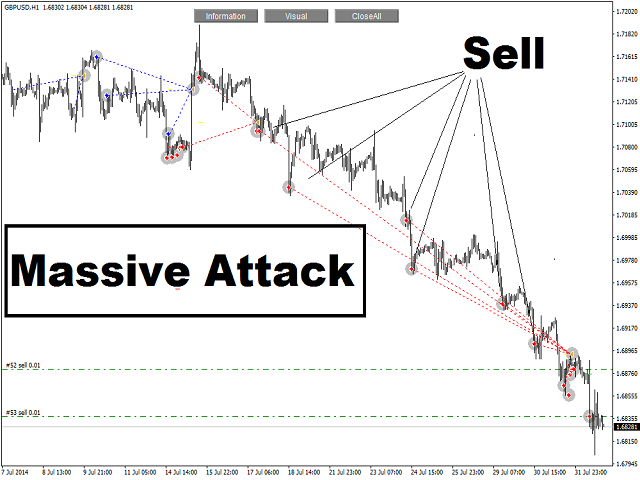
- Massive Attack - Grid for trend(see screenshot)
- PipStep 2 - minimum distance between orders
- Period SMMA - period SMMA for Trailing Stop
- Shift SMMA - shift SMMA for Trailing Stop
- PipStopLoss - minimum average Stop Loss
- PipGap - minimum gap on chart
- UseGap - true/false
- Nbars - minimum number of bars used by EA
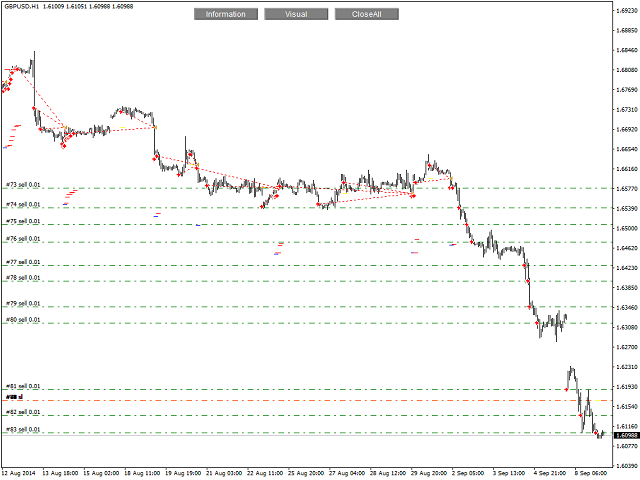
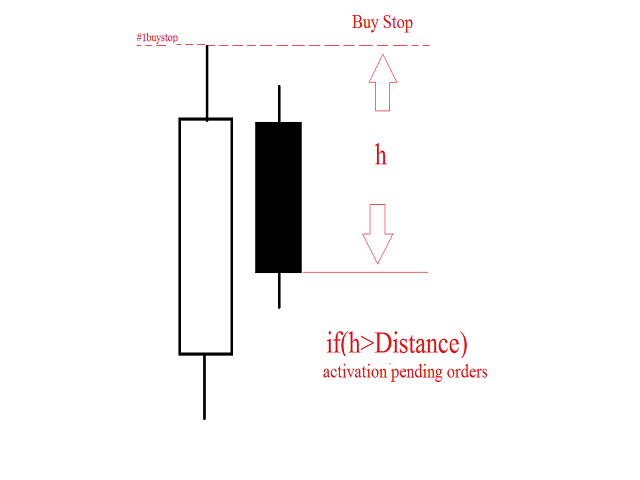
- Distance - activation pending orders (see screenshot)
- TF Trailing Stop - Time frames for Trailing Stop
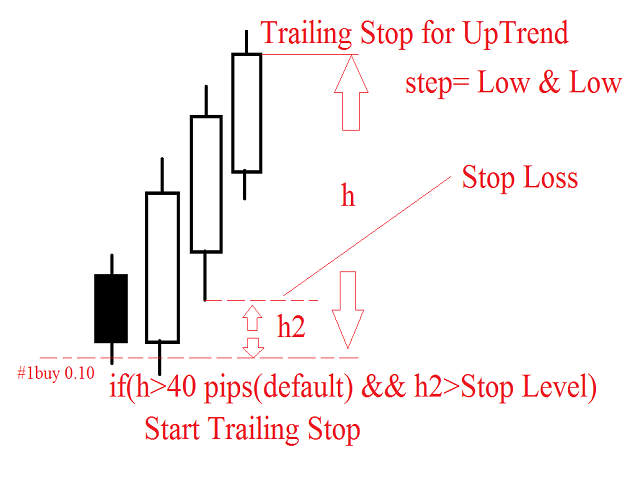
- Activation Trailing Stop - start Trailing Stop (see screenshot)
- Lots - initial lot
- Lotmax - maximum volume
- MaxTradesBuy - maximum trades buy
- MaxTradesBuy - maximum trades sell
- Slippage - slippage
- Take Profit - Take Profit in pips
- Take Profit Average - average Take Profit in pips
- Take Profit Average [Reverse] - average Take Profit for reverse trend
- Moderator - management Take Profit
- Stop Loss [Selection] - choose of Stop Loss
- StopLoss [Account Currency/Close by percentage] - Stop Loss in account currency not in pips/close by percentage
- BreakTF - break
- Break - length of the pause 1=1h, 2=2h etc.
- StartDay - start trading [day]
- StopDay - end trading [day]
- SpeedTest - true/false
Transferring Files
Transferring files between your smartphone and EA and vice versa. How does this work? Send a command from your smartphone and get screenshots of the chart. Required application that synchronizes and backs up files such as photos, documents, and e-mails between desktops, laptops, servers, and external drives. More details? Please write to me.
Enter the command:
- 1 = Alien control [only Long] return 0
- 2 = Alien control [only Short] return 0
- 3 = Alien control [Short & Long] return 0
- 4 = Alien control [Trend] return 0
- 5 = Alien control [Off] return 0
- 6 = Alien control [Information] return 0 // Information on chart. Send 6 = On and send 6 = Off (alternately)
- 7 = Alien control [Break] return 7
- 8 = Alien control [WindowScreenShot] return 0
File will be created in the folder MQL4Files.

状态:离线 发送信件 在线交谈
姓名:顺水的鱼(先生)
职位:投机客
电话:18391752892
手机:18391752892
地区:默认地区
地址:西安市高新区软件园
邮件:3313198376@qq.com
QQ:3313198376
微信:18391752892
阿里旺旺:顺水的鱼waterfish
Skype:3313198376@qq.com