EAsy ClickTrade
EAsy ClickTrade is the easiest way in the Forex market to:
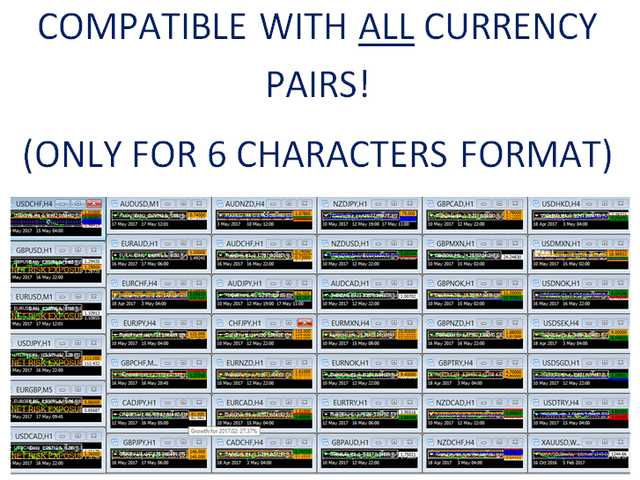
- Execute trades instantly as a function of selected Equity Risk and your desired StopLoss Level for ANY CURRENCY PAIR.
- Calculate the risk exposure to the market in terms of equity at risk per currency and direction.
- Calculate how attractive a potential trade is in terms of Risk and Spread Cost (excellent for scalpers and short-term traders).
Inputs
- Select Risk for Lots Calculation [% Equity]. By default 1%. This is the initial value for the Lots calculator. This value can be modified in the chart itself. For new traders I suggest a low value (0.5-1%).
- Labels Color. Orange by default.
- Labels font size. Self-explanatory.
- TakeProfit initial value [win vs loss ratio]. When an 'instant order' is open, the StopLoss is automatically set at the calibrated Risk. EAsy ClickTrade will also set a TakeProfit target based on the desired Win:Loss ratio. By default, 1.0 means TargetProfit=TargetLoss. The TakeProfit can be freely modified once the order is created. If TakeProfit is not desired, simply set 1.0
- Select StopLoss line color. Self-explanatory.
Instructions
For easier instructions watch my video tutorial. Steps:
- Execute EAsy ClickTrade and make sure Allow live trading and AutoTrading are activated.
- Set inputs as required (see 'Inputs' above). If you are not familiar with them, leave default values as they can be modified during operation in the chart.
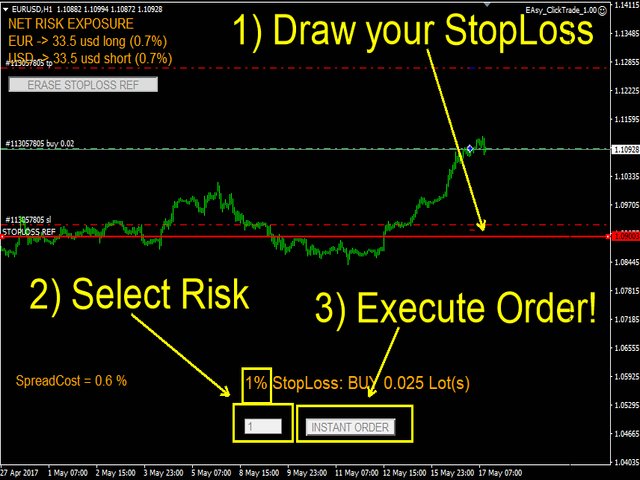
- If the currency trade is recognized, you should see the NET RISK EXPOSURE panel and the GENERATE STOPLOSS REF button. Click on it.
- A wide horizontal line will show up at the current Bid price. Now, you are free to move the line up or down to set your desired StopLoss Level. By default, EAsy Click Trade will recognize the intended trade as SELL if you place the line above and BUY if you place it below.
- You have now a text of the type: _% STOPLOSS: BUY/SELL __ LOTS. The default risk percentage can be modified anytime by typing the new Risk below and pressing ENTER. The new calculation will be displayed now. Now, you have two options, either you open the trade manually with the provided Lots info required or click on INSTANT TRADE and the order will be open fast and both StopLoss levels will be set for you.importANT: once you place the STOPLOSS REF LINE at the desired level, please wait at least for 1 price tick/movement for the calculation to be updated.
 联系方式公司:顺水的鱼外汇EA
状态:离线 发送信件 在线交谈
姓名:顺水的鱼(先生)
职位:投机客
电话:18391752892
手机:18391752892
地区:默认地区
地址:西安市高新区软件园
邮件:3313198376@qq.com
QQ:3313198376
微信:18391752892
阿里旺旺:顺水的鱼waterfish
Skype:3313198376@qq.com