


Mr Lowry Pro
Mr. Lowry Pro is an automated trading system based on Scot Lowry moving average cross. This simple but effective method provides an optimal way to enter and exit the market by comparing the behavior of three moving averages, which combined with the advantages of an EA and the optimized parameters of SL and TP, results in a great automated trading tool.
Input Parameters
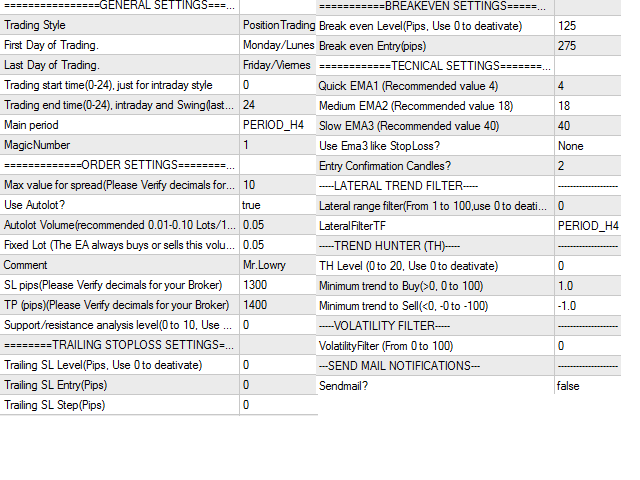
- Trading Style: Select "Intraday" if you want your trades to close on the same day, "Swing" if you want your trades to close the same week and "Positioning" if you want to keep your trades open for more than a week.
- First Day of Trading: Select the day, on which you want to start trading.
- Last Day of Trading: Select the day, on which you want to end trading.
- Trading start time(0-24), just for intraday style: Indicate the time (0-24H), at which you want to start trading, only applies to intraday mode.
- Trading end time, intraday and Swing(last day of week): Indicate the time (0-24H) in which you want to finish operations, apply the last day of operation in Swing mode and every day in Intraday mode.
- Main period: Select the period you want to trade in (Moving averages are calculated with this value and not with the TF of the chart).
- Magic Number: Define a magic number, a different magic number is recommended for each chart.
- Max value for spread (Please Verify decimals for your Broker): Enter the maximum value you want, the EA will not open operations if the spread is greater.
- Use Autolot?: Define if you want to use Auto Lot or Fixed Lot.
- Autolot Volume(recommended 0.01-0.10 Lots/1k USD of Capital): For Auto Lot, enter the number of lots you want to open for each 1K dollars of capital.
- Fixed Lot (The EA always buys or sells this volume): For Fixed Lot, enter the number of lots you want to open each trade.
- Comment: Enter a comment for the operations.
- SL pips (Please Verify decimals for your Broker): Enter the Stop Loss level in pips.
- TP pips (Please Verify decimals for your Broker): Enter the level of Take Profits in pips.
- Support/resistance analysis level(0 to 10, Use 0 to deativate): This filter restricts operations by executing only those signals that match the breakout of support or resistance levels.
- Trailing SL Level(Pips, Use 0 to deactivate): Indicate the value of the Trailing Stop loss in Pips.
- Trailing SL Entry(Pips): Enter the profit margin in pips from which you want to activate the TSL.
- Trailing SL Step(Pips): Indicate how often you want the Stop loss to be updated in Pips.
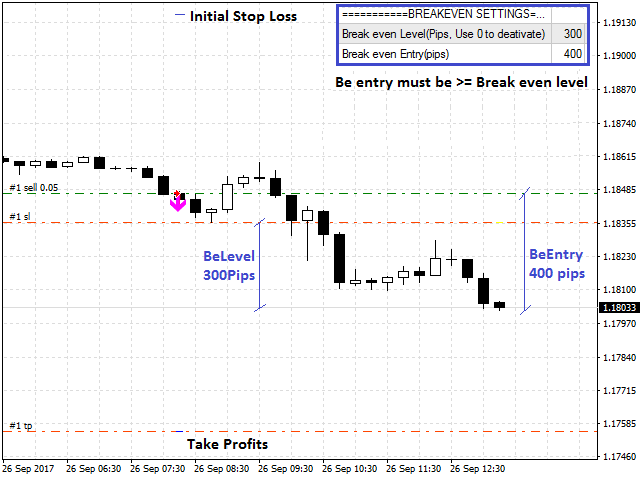
- Break even Level(Pips, Use 0 to deactivate): Indicate the value of the Break Even in Pips.
- Break even Entry(Pips): Enter the minimum profit margin required to place the Break Even.
- Quick EMA1 (Recommended value 4): Indicate the fast Moving Average period. (Recommended value = 4).
- Medium EMA2 (Recommended value 18): Indicate the intermediate moving average period. (Recommended value = 18).
- Slow EMA3 (Recommended value 40): Indicate the Slow Moving Average period. (Recommended value = 40).
- Use EMA3 Like SL?: Select if you want to use the third EMA as SL.
- Entry Confirmation Candles?: Define a number of candles to confirm the trend.
- Lateral range filter(From 0 to 100, use 0 to deactivate): Enter a value, this value represents the minimum average movement in Pips required to open buy or sell trades.
- LateralFilterTF: Set the Timeframe to calculate the lateral range filter, a Timeframe >= Main Period is recommended.
- TH Level (0 to 20, Use 0 to deactivate): Select a value for the trend hunter filter.
- Minimum trend to Buy(>0, 0 to 100): Set a value> 0, this defines the minimum force required for the trend to open buy trades.
- Minimum trend to Sell(<0, 0 to 100): Set a value <0, this defines the minimum force required for the trend to open sell trades.
- VolatilityFilter (From 0 to 100): This is a volatility filter that avoids situations of low or high volatility, looking for normal market conditions to trade.
- Sendmail?: Select if you want to activate notifications by email.
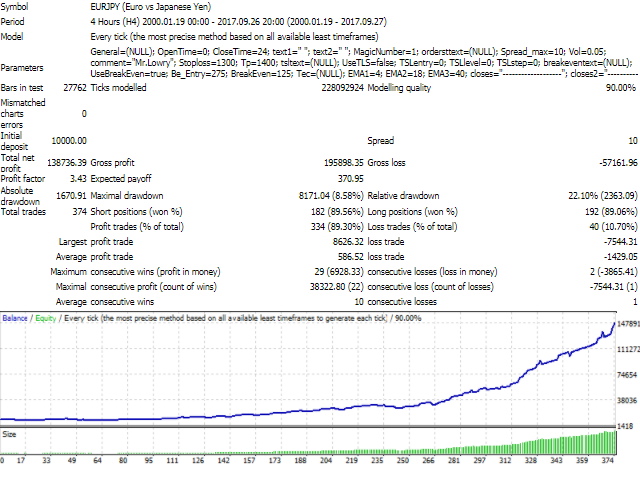
important: The default input values for the Expert Advisor are optimized with historical data for the last 18 years for EUR / JPY in Main Period of 240 minutes. When you use this EA you should be aware that the results in the past are no guarantee of success in the future and that no one but yourself is responsible for any decisions or investment you make in the market.
Tip: The EA uses only opening prices so it is not necessary to optimize each Tick, I recommend always optimizing with the open price model "Open price only" in 1M period, regardless of the "Main Period" defined in the input variables. Make sure you have complete information for all periods in the metaTrader 4 history center.
状态:离线 发送信件 在线交谈
姓名:顺水的鱼(先生)
职位:投机客
电话:18391752892
手机:18391752892
地区:默认地区
地址:西安市高新区软件园
邮件:3313198376@qq.com
QQ:3313198376
微信:18391752892
阿里旺旺:顺水的鱼waterfish
Skype:3313198376@qq.com