

AutoSL Plus
Open and manage your orders with preset parameters.
A simple to use, customizable graphical panel to open and manage orders with preset parameters.
Parameters
- Color Theme - choose one of 4 themes for the panel.
- Zoom - panel size: 6 sizes available.
- Slippage - only applicable for 'Instant Execution'.
- Max Trades
- Max Spread
- Lot Size
- Stop-Loss
- Take-Profit - optional.
- S-L Increment.
Features
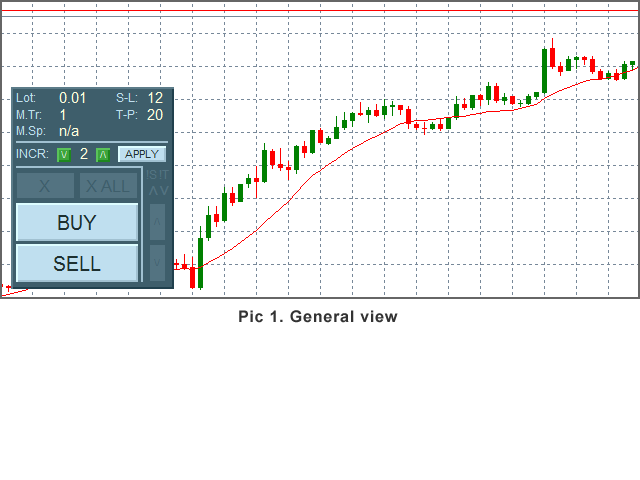
- Current parameters display.
- Buttons BUY, SELL
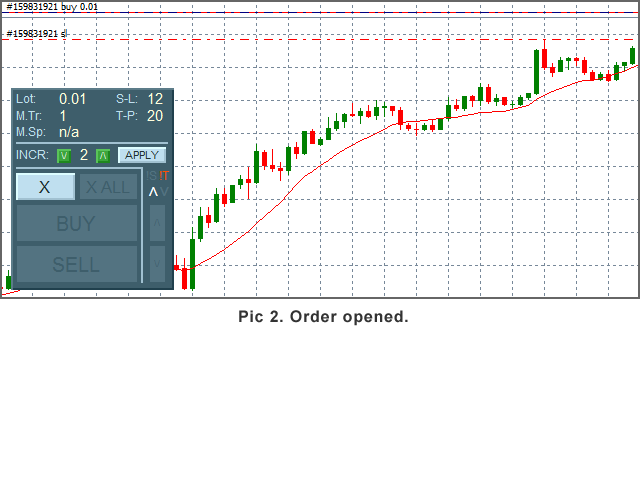
- Button 'X' (Close) - activates after an order opens.
- Button 'X ALL' - close all orders, activates when 2nd order opens.
- In-Panel Form - use if you want to change SL Increment.
- '!' Indicators - show up when Spread > Max Spread or 'Max Trades' reached.
- Arrow-indicators - show current order type.
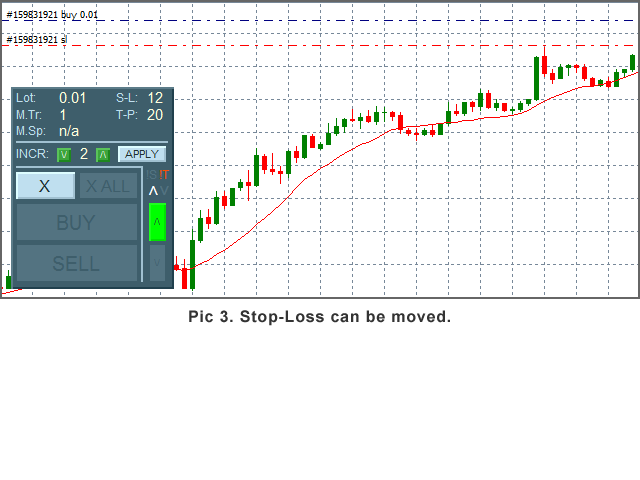
- Buttons to move SL
Set your parameters up and open an order by clicking a button. You can open as many orders as the parameter Max Trades is set to (one click - one order opens).
Order will not be opened if current Spread > Max Spread - useful if you trade fast-moving markets, e.g. around economic news.
When SL can be moved, the button SL Down or SL Up will show up. SL Increment controls the minimum pips that the SL can be moved by.
Close the order(s) by clicking an appropriate button. ('X' if you want to close one order, 'X ALL' if you want to close all orders).
You can move the panel across the chart window: just double-click the top part of the panel, then click, hold and drag the panel to another place. Double-click the area again to keep the panel in the new position.
Notes
If you make any changes to the parameters using the MT 'Inputs' window (F7), the SL Increment will be reset to its initial value.
If you want to test the robot in the Strategy Tester, use the 'Visual Mode'. Note that the In-Panel Form is not working in the Strategy Tester.
状态:离线 发送信件 在线交谈
姓名:顺水的鱼(先生)
职位:投机客
电话:18391752892
手机:18391752892
地区:默认地区
地址:西安市高新区软件园
邮件:3313198376@qq.com
QQ:3313198376
微信:18391752892
阿里旺旺:顺水的鱼waterfish
Skype:3313198376@qq.com